

bytemail screenshots
What is bytemail?
bytemail is a native email client for macOS, built in Swift with SwiftUI and AppKit and nothing else: no bundled browser, no web wrapper. It puts Gmail, iCloud, Outlook, Microsoft 365, Yahoo and any standard IMAP account into one unified inbox on your Mac, with smart tabs, instant search and the everyday tools (snooze, send later, rules, unsubscribe) included from the start.
It is aimed at Mac owners who live in email and dislike where modern email apps went: subscriptions that rent you an inbox, vendor clouds that see your mail, and Electron shells that feel foreign on a Mac. The site's pitch is direct: read, reply and search in an instant, and your mail never touches bytemail's servers, because there are no bytemail servers.
It sits beside Spark, Apple Mail, Mimestream, Canary Mail, Airmail, Thunderbird and Superhuman. Against Spark, the pitch is direct connections with a published network list instead of cloud sync, and one flat price instead of per-user tiers. Against Superhuman, it is a fraction of the price with no new interface to learn. Against Apple Mail, it is the power set Apple doesn't ship.
It is not a team tool, a marketing sender or a Windows app. There are no shared inboxes, no sequences and no Android or Windows version; the iPhone app is in App Store review. It is also young: at the time of checking the app is pre-launch with lifetime licences sold in rising batches, a public changelog and roadmap, and a Discord where the maker answers questions.
A note on shelf life: prices on this page were read from bytemailapp.com on October 12, 2026. The homepage and the pricing page disagreed on two points that day (device count and the current lifetime batch price), and this page follows the homepage where they differ; the research log records both.
How bytemail works
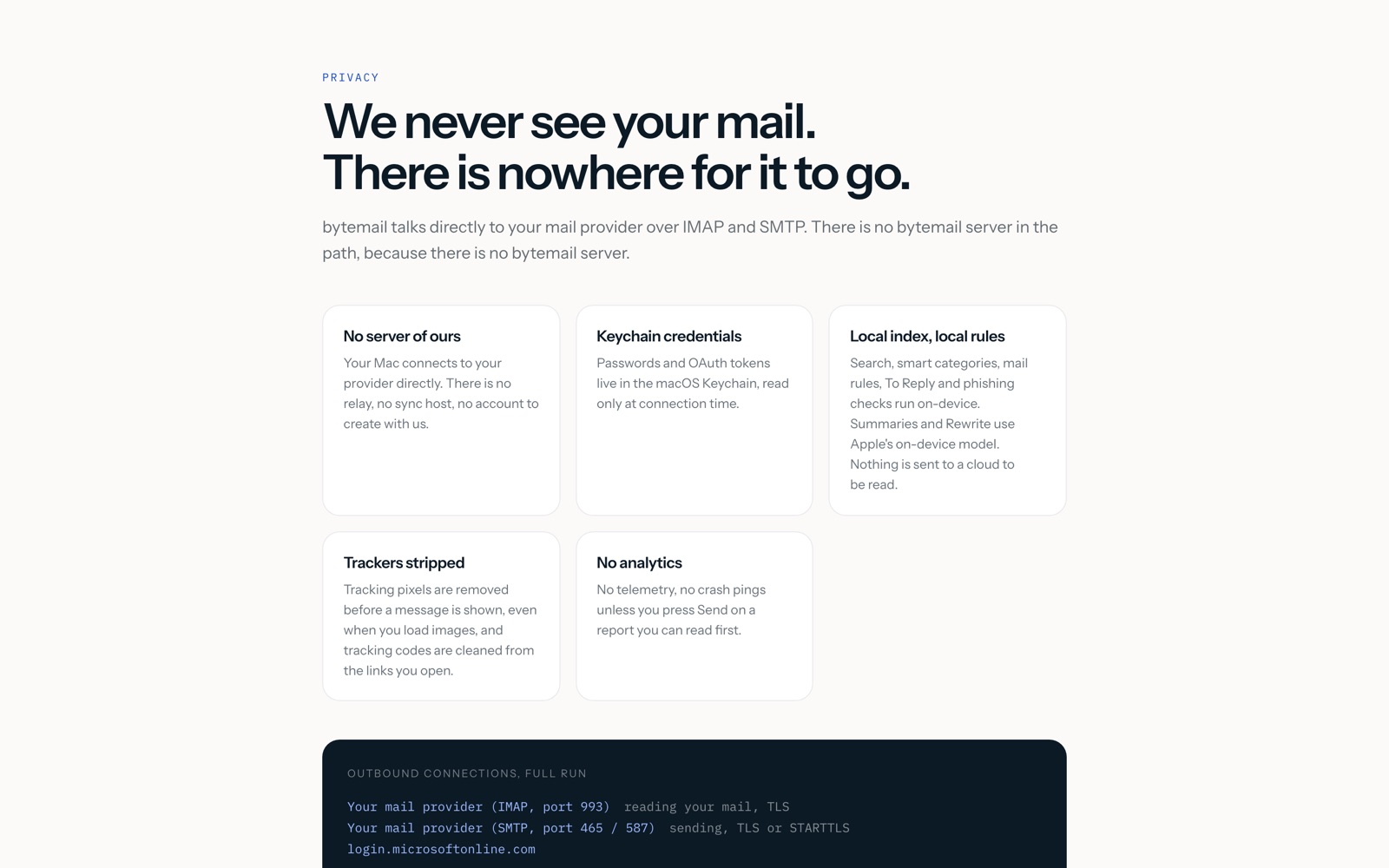
You download bytemail from its site (it is not on the Mac App Store) and add your accounts with one-click sign-in for Google and Microsoft or plain IMAP details for anything else. Passwords and OAuth tokens go into the macOS Keychain, and new mail arrives over IMAP IDLE push with native notifications and a Dock badge. A catch-up sync runs after sleep or a network change.
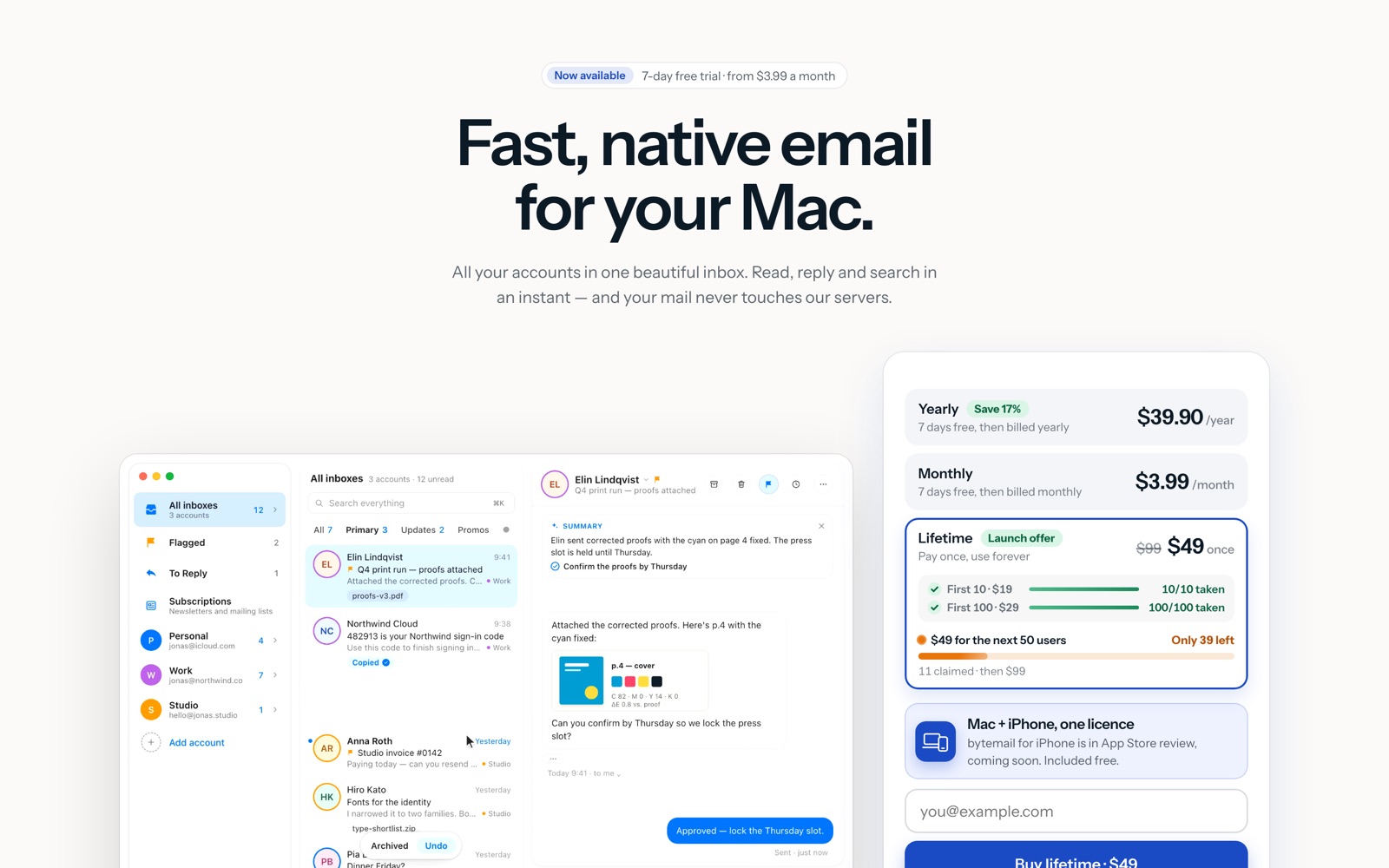
Day to day, everything lives in one window. The unified inbox mixes all accounts with a colour ring on each avatar showing which account a message belongs to, and smart tabs (All, Primary, Updates, Promos) sort mail on your Mac with an unread-only switch for calmer lists. Threads read like a conversation: each message a clean bubble, newest at the bottom, with the reply field docked right underneath.
Search is one ⌘K box over every account and folder at once: senders, subjects, message text and attachment names. The index lives on your Mac, so results arrive in milliseconds and keep working offline. When mail arrives, your rules (sender, subject, text, attachments, mailing list) file it on the server before it reaches the inbox, and the To Reply mailbox collects the conversations where someone is waiting on you.
Safety runs before display. bytemail verifies who really sent each message, flags look-alike domains and brand impersonation, and asks before opening a link that goes somewhere other than it says. Tracking pixels are found and removed before a message is shown, even when you load images, and tracking codes are cleaned from links you open. Sign-in codes arrive in the notification with a Copy Code button so you never open the message.
Sending has guardrails too. Every message waits a few seconds before it leaves (5 to 30, or off), and Undo or ⌘Z brings the composer back with text and attachments intact; archive, trash and move can be undone as well. Snooze hides a conversation until the evening, Friday or a date you pick; Send Later delivers at the hour you choose with a background helper that sends even when the app is closed; follow-up reminders bring a thread back to the top if nobody answers. On macOS 26 with Apple Intelligence, long threads get on-device summaries, suggested replies and Rewrite.
bytemail pricing
bytemail has no free plan, so budget for it from the start. Here's how the pricing works.
| Plan | Price | Billing | Notes |
|---|---|---|---|
| Monthly | $3.99/month | Renews monthly | 7-day free trial; card at start, nothing charged if you cancel |
| Yearly | $39.90/year | Renews yearly | About $3.33 a month; saves $7.98 a year against monthly |
| Lifetime | $49 once | Never renews | Launch offer; early $19 and $29 batches gone; then $99 |
| Licence | 5 devices | One licence | Mac plus the coming iPhone app included free |
USD before tax; tax added at checkout. Prices from the bytemail homepage, checked October 12, 2026.
bytemail is sold two ways: a subscription or a lifetime licence, and every option opens the same full app with no tiers and no per-account fees. Monthly costs $3.99 and renews each month; yearly costs $39.90 and renews each year, which works out to about $3.33 a month. Twelve months on monthly billing cost $47.88, so yearly saves $7.98.
Subscriptions start with a 7-day free trial of the full app, not a cut-down demo. You add a card when the trial starts and it is not charged until the 7 days are up; cancel before then and you pay nothing, and there is one trial per person. The lifetime licence has no trial, but pre-orders can be cancelled for a full refund any time before the app is delivered.
The lifetime licence is the simplest option if you dislike subscriptions: pay once, keep using it, no renewal date. It sells in rising batches ($19 for the first 10, gone; $29 for the first 100, gone; $49 for the next 50, with 11 claimed at the time of checking), and the site says the price goes to $99 after that. At $49 it pays for itself in about 15 months against yearly billing.
One licence covers 5 devices on the homepage's wording, and the iPhone app (in App Store review) is included free. Every purchase delivers a licence key by email with instant delivery, and checkout runs through Stripe as merchant of record, so Stripe takes the payment, charges the right sales tax or VAT and sends the receipt. bytemail is not on the Mac App Store and is sold only at bytemailapp.com.
Most people should start with the trial on yearly billing and only buy lifetime once they know they like living in the app. If $49 feels steep for a pre-launch product, wait: subscriptions open at launch with the same 7-day trial, and the lifetime offer has already risen twice. Either way you get the whole app with nothing held back for a higher tier.
Prices change often. Check the current plans on the official site before you pay.
See bytemail pricingbytemail features
- Unified inbox with per-account unread counts and colour rings
- Smart tabs: All, Primary, Updates and Promos, sorted on your Mac
- Instant search with ⌘K across senders, subjects, text and attachment names
- Conversation threads as bubbles with the reply field docked underneath
- Undo Send (5 to 30 seconds, or off), plus undo for archive, trash and move
- Snooze, Send Later with a background helper, and follow-up reminders
- Mail rules on sender, subject, text, attachments or list, filed on the server
- One-click unsubscribe and a Subscriptions list showing every sender with a count
- Calendar invites as cards with Accept, Maybe, Decline and Add to Apple Calendar
- To Reply mailbox of conversations waiting on you
- Sign-in codes copied from the notification banner, magic links opened in one tap
- Phishing checks: sender verification, look-alike domains, brand impersonation and link warnings
- Thread summaries, suggested replies and Rewrite via Apple's on-device model
- Aliases with their own signature and Reply-To on every account
The depth is in the everyday mail handling rather than AI extras. bytemail's own pages describe the inbox as threads that read like a conversation, each message a clean bubble with the newest at the bottom and the reply box docked below it, so reading and answering happen in one place. Search is the other pillar: one ⌘K box over every account and folder at once, with the index on your Mac, which is why results arrive in milliseconds and work offline. The safety set (sender checks, look-alike domain spotting, link-destination warnings, tracking-pixel removal even with images loaded) runs on-device too. Apple's on-device model adds summaries, suggested replies and Rewrite on macOS 26, and nothing about those leaves your Mac either.
How to set up bytemail
- 1
Check your Mac
bytemail needs macOS 14 Sonoma or later on an Apple silicon Mac, with light, dark or System appearance. Intel Macs are not listed as supported, so confirm yours in About This Mac first.
- 2
Download from the site
Get the app at bytemailapp.com/download: it is not on the Mac App Store. Start the 7-day trial from inside the app; the card is added at the start and nothing is charged if you cancel within the 7 days.
- 3
Add your accounts
Sign in once per account: one click each for Google and Microsoft, plain IMAP details for iCloud, Yahoo or anything else. Credentials go to the macOS Keychain, and each account keeps its own folders and unread count.
- 4
Set up sending identities
Add aliases to each account with their own signature and Reply-To, and pick a signature per account with replies optional. Replies go out from the address the mail was sent to.
- 5
Tune the safety net
Pick your Undo Send window (5 to 30 seconds, or off), turn on tracking-pixel blocking and link warnings, and add your first rules (newsletters to a folder, receipts to archive) so the inbox files itself from day one.
- 6
Buy the licence that fits
Stay on monthly or yearly if you prefer paying as you go, or buy the $49 lifetime licence while the launch batch lasts. The key arrives by email with instant delivery; paste it to activate up to 5 devices.
What people use bytemail for
One inbox for work and personal mail
Add Gmail, iCloud and Outlook side by side and triage from the unified inbox, with a colour ring per account and separate unread counts. Rules file newsletters and receipts on the server before they reach you.
Finding any message in milliseconds
Press ⌘K and search senders, subjects, message text and attachment names across every account at once. The on-device index answers in milliseconds and works offline, which matters on planes and hotel wifi.
Catching up after time off
Open the To Reply mailbox to see only the conversations where someone is waiting on you: questions and requests, not newsletters or receipts. Answer down the list and each thread leaves it automatically.
Stopping trackers without going plain-text
Load images freely: tracking pixels are removed before display and tracking codes are cleaned from links you open. Designed mail keeps its look while the surveillance parts are stripped out.
Killing newsletter noise
Tap Unsubscribe on any mailing list for a standard one-click request, then open Settings and Subscriptions to see every sender with a count. The noisy ones are easy to spot and remove in bulk.
Never losing a thread
Set a follow-up reminder (1 day, 3 days, a week or a date) when you send, and the conversation returns to the top unread if nobody answers. Snooze works the same way for mail you receive but can't handle yet.
Answering invites without opening a calendar
Invites arrive as cards with the time in your zone, location and guests. Accept, Maybe or Decline replies to the organizer, and Add to Calendar puts it in Apple Calendar.
Pasting sign-in codes without opening mail
When a sign-in code arrives, the notification shows it with a Copy Code button, and magic links get Open Link. Used codes tidy themselves into the archive, so they never clog the inbox.
bytemail vs Spark Mail
If you're weighing bytemail against Spark Mail, both live in someone else's cloud, so it comes down to price, fit and how much you'd have to move.
| Aspect | bytemail | Spark Mail |
|---|---|---|
| Price to start | 7-day free trial · paid from $3.99/month | Free · paid from $99/year |
| Free plan | No | Yes |
| Self-hosting | No | No |
| Your data | In their cloud, exportable | In the vendor's cloud |
Spark Mail figures are from its pricing page, checked 2026-10-12.
All Spark Mail alternativesbytemail next to similar tools
- bytemail vs Spark Mail
- Spark's free plan covers unlimited accounts with a Smart Inbox, and Plus is $10 a month ($99 a year) per user with AI features; Pro is $20 a month ($199 a year). Spark runs on Mac, Windows, iPhone and Android with team collaboration, but syncs through its own cloud. bytemail is Mac-only with direct connections and a flat price.
- bytemail vs Superhuman
- Superhuman's Starter is $30 a month ($300 a year) per user and Business $40 a month ($396 a year), with no free plan. It is the fastest keyboard-driven triage you can buy for Gmail and Outlook. bytemail costs about a month of Superhuman per year and keeps your existing setup, but has none of Superhuman's speed workflow or AI drafting.
- bytemail vs Mimestream
- Mimestream is a native Mac client at $4.99 a month or $49.99 a year with a 14-day trial and up to 5 devices. It is Gmail-only, built on Google's API, so it feels closest to Gmail itself. bytemail covers Gmail plus iCloud, Outlook and any IMAP account in one inbox.
- bytemail vs Apple Mail
- Apple Mail ships with every Mac, costs nothing and handles the same providers. bytemail adds the power set: cross-account instant search, smart tabs, snooze, send later, rules, tracking-pixel removal, phishing warnings and undo send. If your needs are simple, Apple Mail is all you need.
- bytemail vs Thunderbird
- Thunderbird from Mozilla is free and open source and runs on macOS with solid IMAP support, per bytemail's own comparison. It looks and feels less Mac-like than a Swift client. bytemail is the native, paid alternative with a unified design and on-device search.
Bottom line
Our take on bytemail
If you read mail on a Mac and want a fast native inbox that talks to your providers directly, start bytemail's 7-day trial with your real accounts and test the search, the rules and the unsubscribe list for a week. Buy yearly if it sticks, or lifetime at $49 if you already know you want it for years. Skip it if you need Windows, a free plan or team inboxes: Spark's free plan or Apple Mail covers that today.

 ChatGPT
 Claude
 Perplexity
 Grok
Grok