
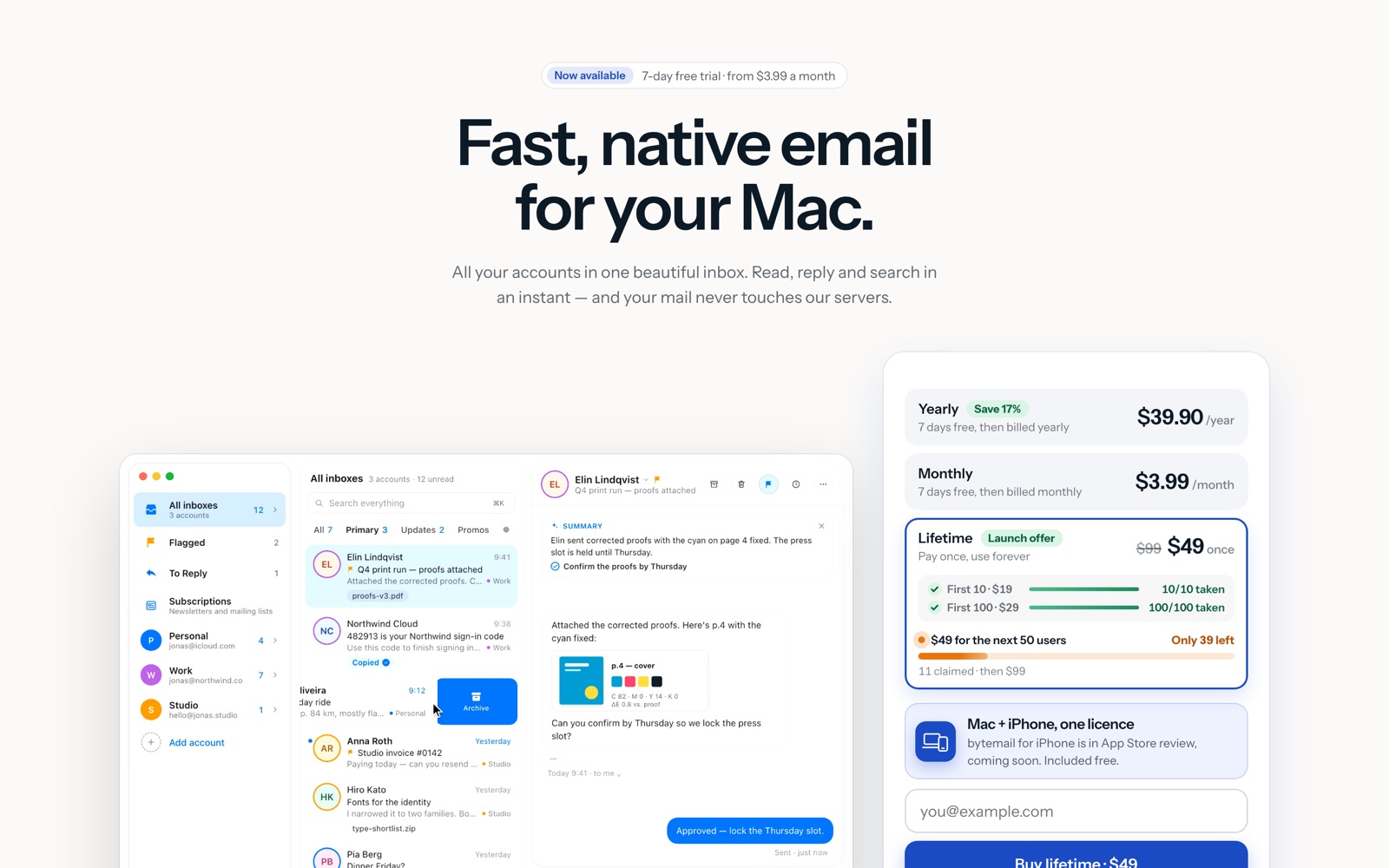
bytemail is a native email client for the Mac that puts Gmail, iCloud, Outlook and any IMAP account into one fast inbox without sending your mail through its own servers. In this bytemail review the short answer is yes for Mac owners with crowded inboxes: it costs $3.99 a month, $39.90 a year, or $49 once for a lifetime licence. The catch is that it is Mac-only, pre-launch, and has no free plan.
We reviewed bytemail from its public pages, pricing page, privacy page and comparison pages as of October 12, 2026. We did not run the app for this review, so nothing below is a claim about how it felt to use; where bytemail makes a claim we could not check, such as its 38 ms search example, we say it is bytemail’s. Our score is 4.0 out of 5, with the scoring explained on the bytemail tool page.
What this review gives you that bytemailapp.com does not: the all-in cost math against Spark, Superhuman and Mimestream, the two places bytemail’s own pages disagree, an honest statement about how little independent evidence exists yet, and who should skip it.
bytemail at a glance
| bytemail | |
|---|---|
| What it is | Native macOS email client (Swift, SwiftUI + AppKit), no bundled browser |
| Who runs it | Serg, independent Mac developer, per the site footer |
| Accounts | Gmail, iCloud, Outlook, Microsoft 365, Yahoo, any IMAP server |
| Requirements | Apple silicon Mac, macOS 14 Sonoma or later |
| Price | $3.99/month, $39.90/year, or $49 lifetime at launch |
| Trial | 7-day free trial of the full app, one per person, card required |
| Devices | 5 per licence on the homepage (the pricing page says 3 Macs) |
| iPhone app | In App Store review, included free when it ships |
| Privacy design | No relay or sync host; Keychain credentials; local index; no telemetry |
| Sold | Only at bytemailapp.com via Stripe; not on the Mac App Store |
How bytemail works
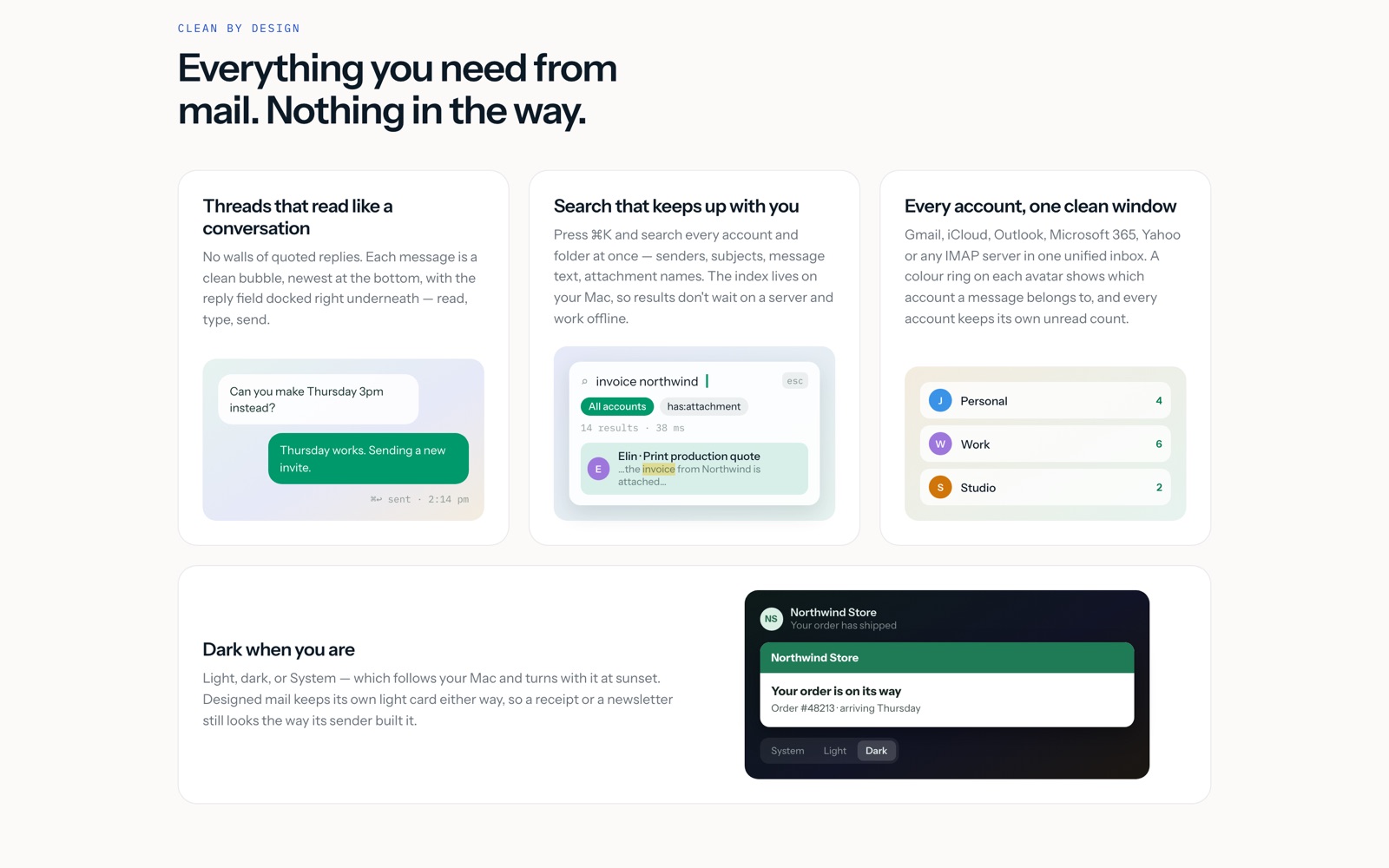
bytemail starts where every email client starts: you add your accounts. Google and Microsoft sign in with one click each, and anything else connects over standard IMAP. Passwords and OAuth tokens go into the macOS Keychain, read only when a connection opens, and new mail arrives over IMAP IDLE push with the Mac’s own notifications and Dock badge. A catch-up sync runs after sleep or a network change, so opening the lid after a flight fills in what you missed.
Day to day, everything lives in one window. The unified inbox mixes all your accounts with a colour ring on each avatar showing which account a message belongs to, and every account keeps its own unread count. Smart tabs named All, Primary, Updates and Promos sort mail on your Mac, each with its own unread count, and an unread-only switch calms the list further. Threads read like a conversation rather than a wall of quoted replies: each message is a clean bubble, newest at the bottom, with the reply field docked right underneath, so you read, type and send without leaving the thread.
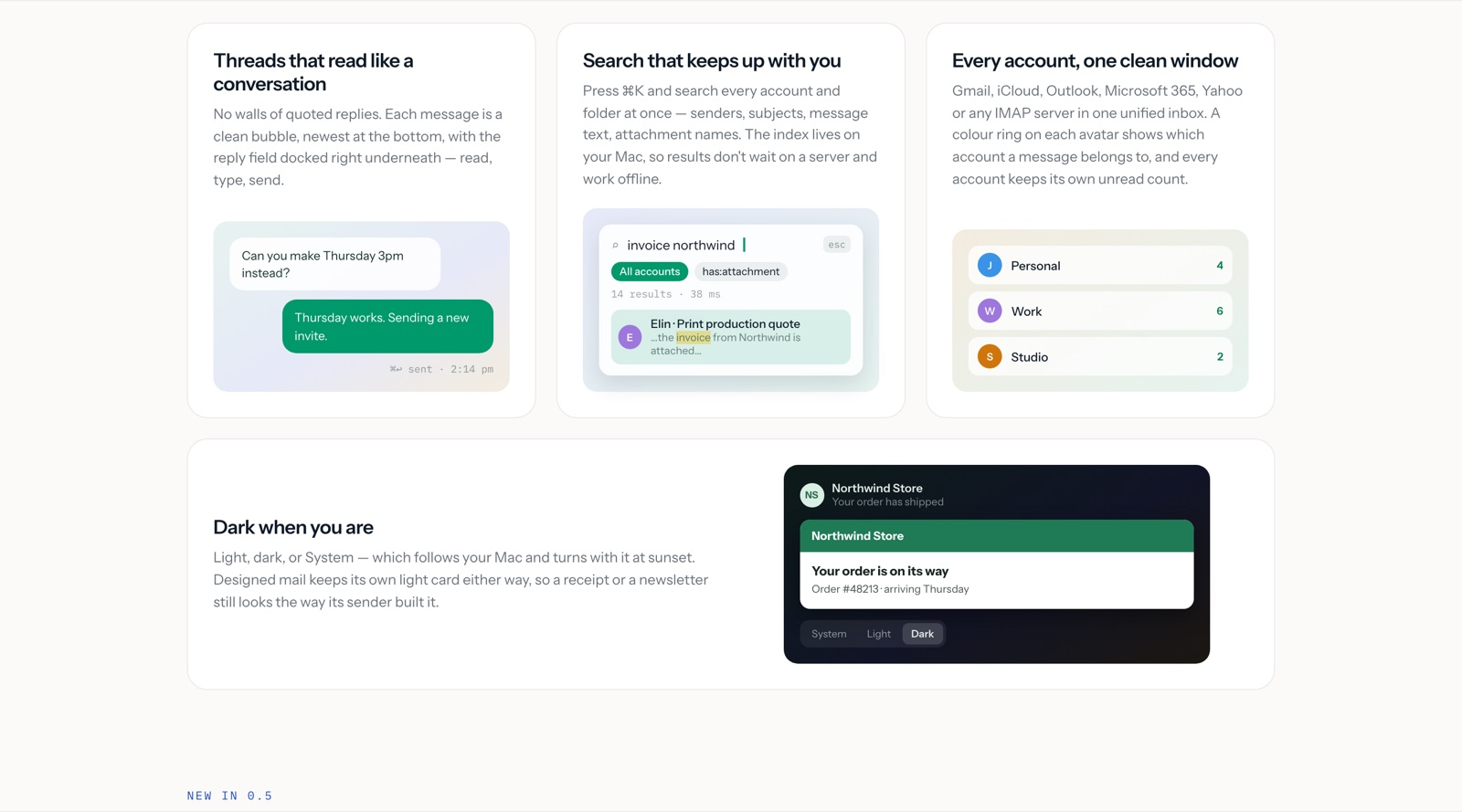
Search is the feature bytemail shows off most. One ⌘K box searches every account and folder at once: senders, subjects, message text, attachment names. The index lives on your Mac, which is why bytemail says results arrive in milliseconds (its example shows 14 results in 38 ms) and why search keeps working offline. If you have ever waited on a webmail spinner for a message you knew existed, this is the part of the pitch aimed at you.
When mail arrives, your rules file it on the server before it reaches the inbox: match on sender, subject, text, attachments or mailing list, then move, archive, mark read or trash. A smart mailbox called To Reply collects the conversations where someone is waiting on you, questions and requests rather than newsletters or receipts, and answering from any device clears them from the list. Snooze sends a conversation away until the evening, Friday or a date you pick, and it comes back on top, unread. Send Later delivers at the hour you choose, with a background helper that sends it and wakes snoozed mail even when bytemail is closed. Follow-up reminders nudge you from the other direction: pick 1 day, 3 days, a week or a date when you send, and if nobody answers by then the thread returns to the top; if they reply, the reminder quietly goes away.
Safety runs before display. bytemail verifies who really sent each message, spots look-alike domains and brand impersonation, and asks before opening a link that goes somewhere other than it says, with Report as Spam and Block Sender right in the warning. Tracking pixels are found and removed before a message is shown, even when you load images, and tracking codes are cleaned from the links you open. Small conveniences stack up: sign-in codes arrive in the notification with a Copy Code button so you never open the message, magic sign-in links get an Open Link button, and a used code tidies itself into the archive. Calendar invites arrive as cards with the time in your zone, location and guests; Accept, Maybe or Decline replies to the organizer, and Add to Calendar puts it in Apple Calendar. On macOS 26 with Apple Intelligence, long threads get a short summary, suggested replies and Rewrite to shorten, soften or translate what you wrote, all on your Mac.
A real job: three inboxes, one calm morning
The job bytemail is built for is the morning triage across a scattered mail setup. Here is how that looks from its documented features. The person is hypothetical: a freelance designer with a Gmail account for clients, an iCloud account for personal mail and an Outlook account for a retainer contract.
She opens one window instead of three tabs. The unified inbox shows all three accounts with colour rings, and the Updates and Promos tabs have already pulled newsletters and receipts aside on her Mac, so the All tab is mostly people. She presses ⌘K, types the client’s name plus “invoice”, and the attachment she half-remembered surfaces from the Gmail account in milliseconds, without waiting on a server.
To Reply shows four conversations where someone is waiting: two client questions, a printer asking to confirm proofs by Thursday, and the retainer asking for a call slot. She answers the two quick ones from the docked reply fields, snoozes the printer thread until Thursday morning, and sends the call-slot reply with a 3-day follow-up reminder in case nobody answers. A sign-in code for a print vendor arrives mid-morning; she copies it from the notification banner and never opens the message. At lunch she opens Settings and Subscriptions, sees which senders mailed her most this month, and unsubscribes from three lists with one click each.
What it costs her: the yearly plan at $39.90 covers all three accounts with no per-account fee, and every feature above is in every plan. On Spark the same setup is free, but her mail syncs through Spark’s cloud; on Superhuman it would be $300 a year for one seat. That trade is the whole decision, and the next sections price it exactly.
What bytemail costs
bytemail is sold two ways, as a subscription or as a lifetime licence, and every option opens the same full app on every device the licence covers. From bytemail’s homepage, checked October 12, 2026:
| Plan | Price | Billing | Notes |
|---|---|---|---|
| Monthly | $3.99/month | Renews monthly | 7-day free trial; card at start, nothing charged if you cancel |
| Yearly | $39.90/year | Renews yearly | About $3.33 a month; saves $7.98 a year against monthly |
| Lifetime | $49 once | Never renews | Launch offer; early $19 and $29 batches gone; then $99 |
Prices are in US dollars before tax, with sales tax or VAT added at checkout. A quick budget for the situations most readers are in:
- Trying it out: $0 for 7 days on Monthly or Yearly, then cancel or keep. One trial per person.
- One person for a year: $39.90 on Yearly, or $47.88 across twelve months of Monthly. Yearly is the sensible default.
- One person for three years: $119.70 on Yearly against $49 once for lifetime. Lifetime wins by about $70 if the app lasts, which is the bet every lifetime deal asks you to make.
- A five-person studio: five licences, since licences are per person, not per team. Yearly is $199.50 a year; lifetime is $245 once at the launch price. There are no team features either way, so this math only matters if all five want the same client.
Yearly billing takes about 17% off the monthly rate: twelve months at $3.99 would be $47.88, and $39.90 saves you $7.98. The lifetime licence at $49 pays for itself in about 15 months against yearly billing, by our arithmetic. Those early batches tell you the pricing direction: $19 for the first 10 (gone), $29 for the first 100 (gone), $49 for the next 50 with 11 claimed at the time of checking, then $99. If you want lifetime, waiting costs money; if you are unsure the app survives, waiting costs nothing, because subscriptions open with the same trial.
Privacy and guardrails: what the app can see
This is the section that separates bytemail from nearly every client at its price, so it deserves care. The design claim is simple: your Mac talks straight to Gmail, iCloud, Outlook or your IMAP server, with no bytemail cloud in between. There is no relay, no sync host and no bytemail account to create. Credentials live in the macOS Keychain, the local message cache is an SQLite database inside the app’s container (covered by FileVault like the rest of your disk), and deleting the app deletes the cache. Search, smart categories, rules, To Reply and phishing checks run on-device; summaries and Rewrite use Apple’s on-device model. The site says there is no telemetry and no crash pings unless you press Send on a report you can read first.
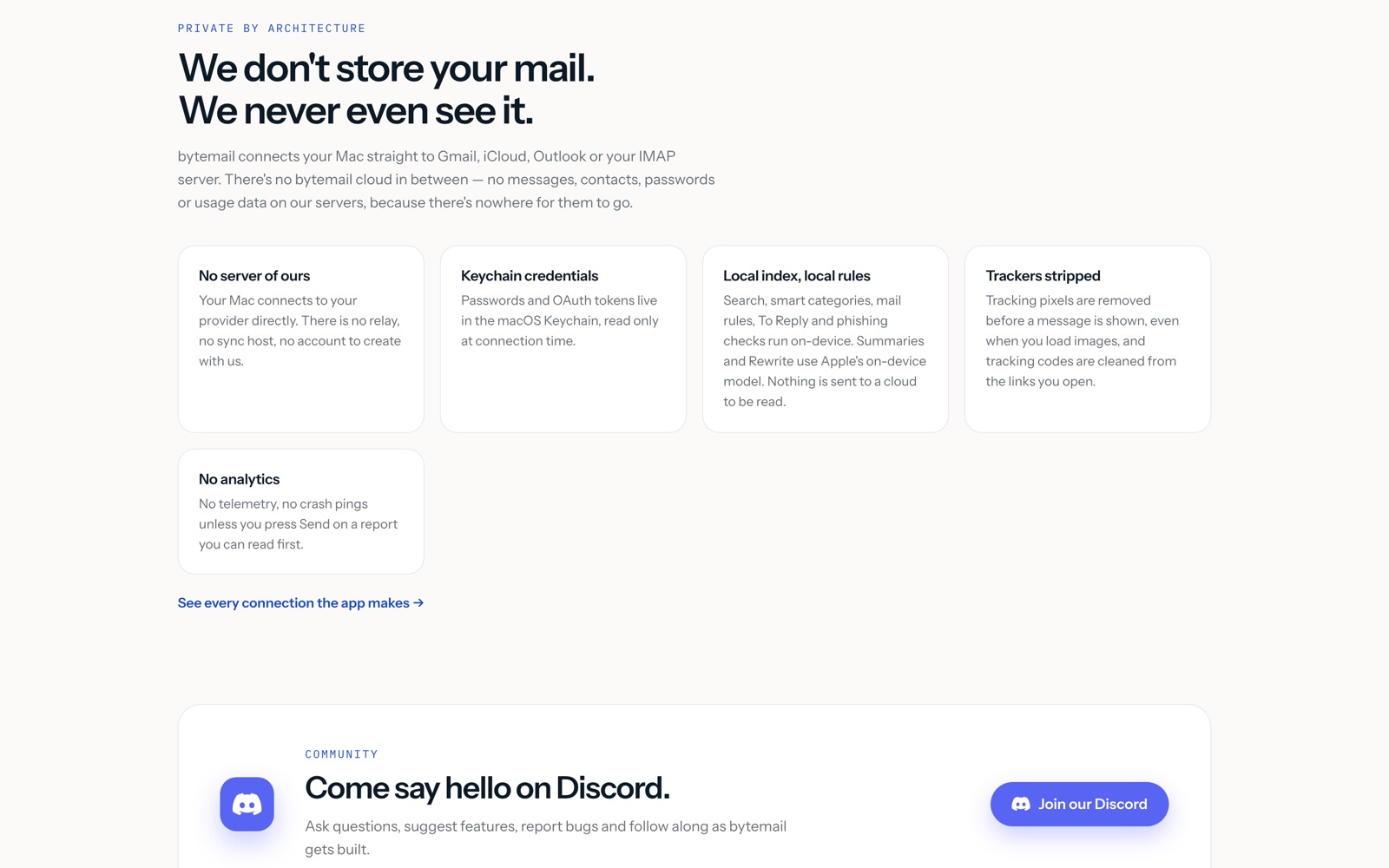
What convinced us this is more than a slogan is the connection list on bytemail’s privacy page. bytemail publishes every network connection the app makes: your provider’s IMAP and SMTP servers, Microsoft’s login page only when you sign in with Microsoft, sender websites for brand icons in avatars, image hosts inside a message only after you choose to load remote images, a mailing list’s unsubscribe address only when you press Unsubscribe, and bytemailapp.com itself for update checks plus licence checks carrying your key, a hashed ID for the Mac and its name. The page says that is the whole list. You can audit that claim with a firewall, which is more than Spark, Superhuman or Mimestream publish.
Two honest limits belong here. First, direct connections do not make phishing impossible; they remove one party that could read your mail, and bytemail’s sender checks and link warnings are the layer that catches attacks. Second, privacy pages describe intent, not code, and we have not inspected the app. Treat the connection list as a checkable promise rather than a verified fact, and check it if your threat model needs that.
Setting bytemail up: what the first week looks like
None of this is hard, but the order matters, and getting it wrong is what usually costs people their trial week. This is the sequence we would follow, built from bytemail’s own pages:
- Check the Mac first. Confirm Apple silicon and macOS 14 or later in About This Mac. Intel Macs are not listed as supported, and discovering that after migrating rules would be an annoying afternoon.
- Download from the site and start the trial inside the app. bytemail is not on the Mac App Store, so get it at bytemailapp.com/download. The card goes in at the start of the 7 days; put a reminder on day six to decide, because there is no second trial for the same person.
- Add one account, then the rest. Start with your busiest account so the trial week tests the real load. Google and Microsoft each take one click; iCloud, Yahoo or anything else needs plain IMAP details. Each account keeps its own folders and unread count, so check that every folder you rely on appears before you add the next account.
- Rebuild your sending identities. Add aliases with their own signature and Reply-To, set a signature per account, and send one test mail from each alias to yourself. Replies go out from the address the mail was sent to, so a misconfigured alias is how clients end up replying to your personal address.
- Set the safety net before the mail flood. Pick your Undo Send window (we would take 30 seconds for the trial week), confirm tracking-pixel blocking is on, and write your first three rules: newsletters to a folder, receipts to archive, and your most-cluttered sender to mark-read. Rules file on the server, so they keep working even before you open the app.
- Run it alongside your old client for a week. Accounts live with your provider, so adding the same logins to bytemail changes nothing about your mail itself. What does not transfer is client-specific state: Spark snoozes, Superhuman splits and Apple Mail local folders stay where they were. Keep the old client installed until the iPhone app ships anyway, since your phone still needs one.
Migrating is deliberately boring, which is the point: there is no export, no CSV, no DNS change. The only thing you carry by hand is your rules and your signatures, and an hour covers both.
bytemail pricing plans in detail
Three plans, one app, no tiers. Monthly at $3.99 renews each month and yearly at $39.90 renews each year; both start with the 7-day trial, and cancelling before the trial ends means you pay nothing. The lifetime licence is paid once and never renews; “lifetime” means for as long as bytemail is offered and maintained. Every plan includes Gmail, iCloud, Outlook, Yahoo and IMAP accounts, the unified inbox and smart tabs, on-device search, tracking-pixel blocking, unsubscribe handling, snooze, Send Later, reminders, rules, the safety checks and automatic updates.
Checkout runs through Stripe, which is the merchant of record: Stripe takes the payment, charges and pays the right sales tax or VAT, sends your receipt and appears on your card statement. bytemail never sees your card details. It is sold only at bytemailapp.com and is not on the Mac App Store. Cancelling a subscription happens in the app under Settings, Licence, Manage Subscription, or on link.com, and the app keeps working until the end of the period you paid for. A failed renewal ends the subscription. Pre-order lifetime licences can be cancelled for a full refund any time before the app is delivered by emailing support from the address ordered with; bytemail says that if the app were never released, every pre-order would be refunded in full.
One wrinkle to know before you pay: bytemail’s own pages disagree on the device count. The homepage says 5 devices on one licence, while the pricing page says 3 Macs. The pricing page also still shows the older $29 pre-order batch while the homepage shows the live $49 batch. We followed the homepage in this review and flagged both in our research log. Confirm the number on the checkout page before you buy, especially if you plan to cover a desktop, a laptop and a phone with one key.
The catch
- Mac-only, Apple silicon only. No Windows, no Intel Macs, no Android, and the iPhone app is still in App Store review. If your mail follows you onto a Windows laptop, bytemail cannot follow.
- Pre-launch software from one maker means the roadmap is a promise, not inventory. The changelog, roadmap and Discord are public and active, which is the good version of this story, but summaries need macOS 26, the iPhone app needs Apple’s review queue, and young apps slip dates.
- No free plan. After one 7-day trial per person, you pay or leave. Spark, Apple Mail and Thunderbird all cost $0 forever, so bytemail has to earn its price every year against free.
- The lifetime price only moves up. $19 and $29 are gone, $49 shows 11 claimed of 50, then $99. That is fair scarcity rather than a dark pattern, since the site prints the batch counts, but do not mistake it for a floor.
- No team features. No shared inboxes, assignments or collaboration, so a studio that answers support mail together still needs Spark, Missive or a help desk next to it.
What people say about bytemail
Honesty requires a short section here: we found almost nothing. There is no G2 page, no Reddit thread and no X discussion we could locate about bytemail. The only third-party signals are the two badges in bytemail’s own footer: an Uneed Daily Winner badge and a Featured on TryMacApps badge. Those say the launch got noticed on two directories; they say nothing about whether the app is good.
We are not filling that gap with invented reception. No quoted users, no star counts, no “people love it” appear in this review, because none are sourced. What we can point at instead is maker behaviour: a public changelog and roadmap, a Discord server for questions and bug reports, and comparison pages that disclose bytemail as the publisher and mark unverified competitor facts as needing a check on the vendor’s page. That is how a solo developer should behave before launch. When we run the app hands-on, these are the things we will check and add here with the date: real launch speed and memory against Apple Mail, whether search matches the 38 ms claim on a large mailbox, what the upgrade and licence prompts look like, how export and account removal work, and whether the iPhone app shipped.
bytemail alternatives
Each price is from the vendor’s own page on October 12, 2026. Our Spark Mail alternatives page sets its plans beside bytemail’s, and our bytemail tool page keeps the full comparison table.
| bytemail | Spark | Superhuman | Mimestream | Apple Mail | |
|---|---|---|---|---|---|
| Price | $3.99/mo, $39.90/yr, $49 lifetime | Free; Plus $10/mo, Pro $20/mo per user | Starter $30/mo, Business $40/mo per user | $4.99/mo or $49.99/yr | $0 with the Mac |
| Trial | 7 days, card required | 7-day trial of Plus/Pro | 30-day trial | 14 days, no card | None needed |
| Accounts | Gmail, iCloud, Outlook, IMAP | Unlimited accounts | Gmail, Outlook | Gmail only | Most providers |
| Platforms | Mac (Apple silicon) | Mac, Windows, iOS, Android | Mac, iOS, Android, web | Mac, iPhone, iPad | Apple devices |
| Mail path | Direct, no vendor cloud | Syncs via Spark cloud | Via Superhuman | Google API | Direct |
- Spark is the alternative most readers are leaving or considering. Its free plan covers unlimited accounts with a Smart Inbox, Plus adds AI features at its listed prices, and it runs everywhere with team collaboration. Pick Spark if you want free, Windows, or shared inboxes; pick bytemail if Spark’s cloud sync and per-user pricing are what bother you.
- Superhuman is the speed instrument: keyboard-first triage, split inbox, snippets and read statuses at $30 to $40 per user a month with no free plan. One year of Superhuman Starter costs six years of bytemail Yearly. Pick it if you process hundreds of messages a day and will learn the workflow; otherwise bytemail keeps most of the calm for a fraction of the price.
- Mimestream is the native Mac purist’s Gmail client at $4.99 a month or $49.99 a year with a 14-day trial. It is Gmail-only by design, so mixed iCloud and Outlook setups rule it out. Pick it if you live in Gmail and want the closest-to-Gmail feel on a Mac.
- Apple Mail ships with your Mac, costs nothing and handles the same providers directly. Pick it if your needs are simple; pick bytemail when you miss cross-account search, snooze, send later, rules and tracker blocking enough to pay for them.
- Kit is a different kind of email tool worth naming so nobody confuses the two: it sends newsletters and sequences to an audience, while bytemail reads and answers your own mail. Many readers will own both, which is why Kit anchors the must-have tools for founders. Our Kit review covers its free plan to 10,000 subscribers.
Who should use bytemail
Use bytemail if you read mail on an Apple silicon Mac, juggle two or more accounts, and want one fast native inbox that never routes your mail through a vendor’s servers. Start the 7-day trial with your real accounts, test the ⌘K search on your biggest mailbox, build three rules and check the Subscriptions list at the end of the week. If the week feels calmer, buy Yearly; if you already know this is your client for years, buy the $49 lifetime while the batch lasts.
Skip bytemail if you need Windows or Intel Mac support, want a free plan (Spark’s free tier or Apple Mail), process enough mail to justify Superhuman’s speed workflow, answer mail as a team (you need shared inboxes), or only use Gmail on a Mac (Mimestream fits tighter). Casual mail checkers should not pay for any of this: Apple Mail is already on your Mac and already good enough.
Our verdict: bytemail is the inbox we would try first on a new Mac in 2026, with eyes open. The native build, the direct connections with a published list to audit, and the flat pricing are real differences, and $39.90 a year is modest against what it replaces. The youth of the product is the real price: confirm the device count at checkout, keep Apple Mail installed until the iPhone app ships, and let the trial week decide.
bytemail readers who run their own business should see the must-have tools for founders and the freelancer stack; the productivity category lists every tool we cover for the workday, and the Superhuman and Apple Mail alternatives pages keep the comparison prices current.




 ChatGPT
 Claude
 Perplexity
 Grok
Grok