

Squad screenshots
What is Squad?
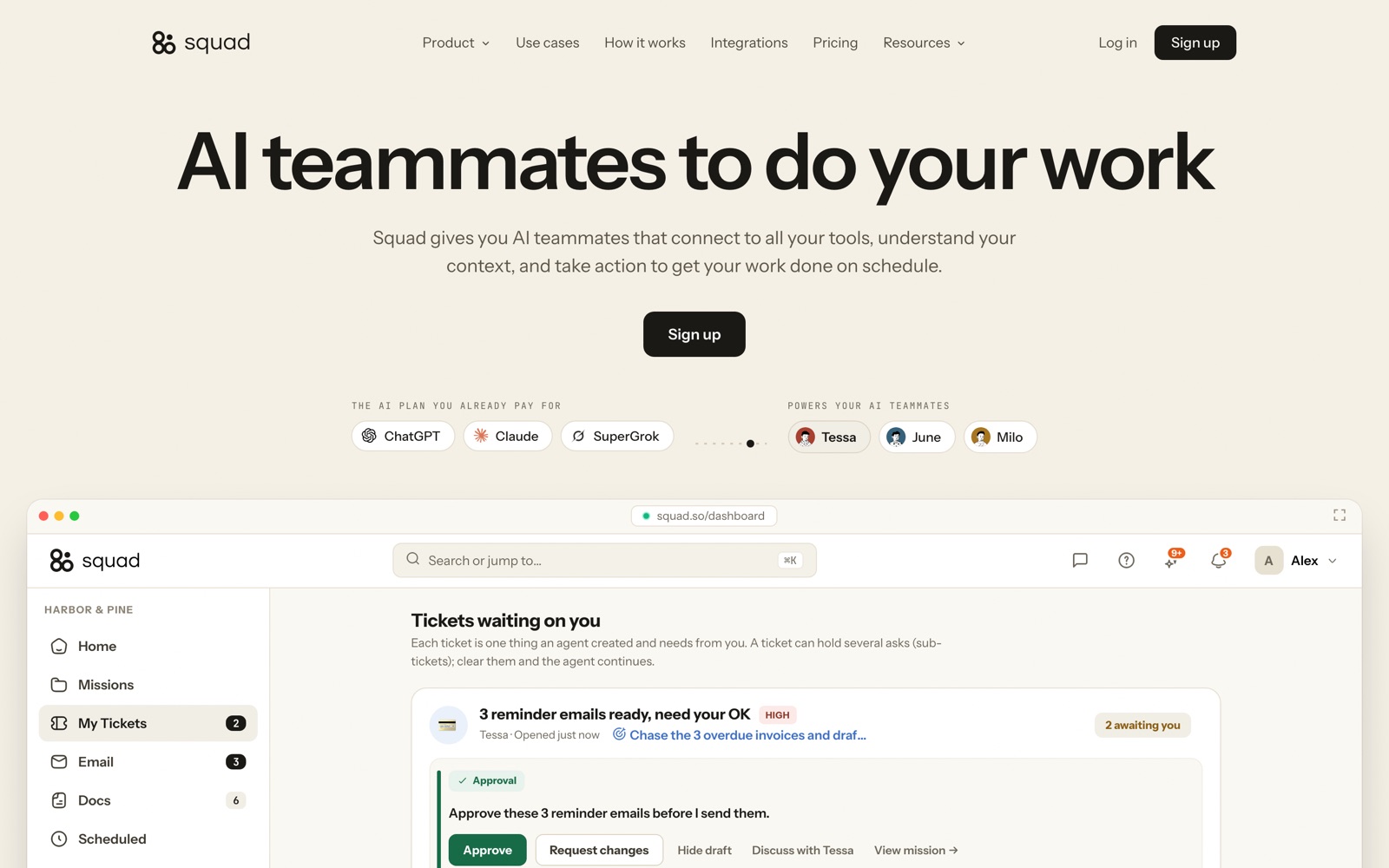
Squad is a hosted service that gives you AI teammates for recurring business chores. Each teammate holds one job (chasing overdue invoices, clearing the inbox, building Monday's revenue report), runs it on a schedule inside the tools you connect, and asks before doing anything a customer would see.
It used to be called MissionControlHQ and took the Squad name in August 2026. If you search for "Squad AI" you'll mostly land on meetsquad.ai, an unrelated product for product managers; this page covers squad.so.
The pricing model is unusual. Squad charges a flat $99 a month and doesn't sell AI at all: the work runs on the ChatGPT, Claude or Gemini subscription you already have. That keeps Squad's own bill flat and makes your AI plan the thing that scales.
Compared with Zapier or n8n you don't build a flow; you describe the job the way you'd brief a new hire. Compared with a chatbot, a teammate has its own computer, browser and inbox, so it can work in sites that have no integration and keep going while you're offline.
We've reviewed Squad from its public pages as of September 29, 2026, not from a paid account. Capability claims below are Squad's own unless we say otherwise; the dated verdict, cost scenarios and customer quotes are in our full Squad review on the blog.
How Squad works
Setup starts with a conversation. The AI Chief of Staff asks about your business and proposes a squad: named teammates, each with a role, a schedule and the tools it may touch. Squad's demo workspace has one on billing, one on the inbox, one on meetings and content and one on hiring.
Every job gets written down. The Chief of Staff turns your description into a process document you can edit, so when a teammate gets something wrong you change a sentence in that doc or correct it in chat, rather than debugging nodes.
Each teammate runs on a dedicated cloud computer with its own browser profile and, if you add one, its own email address. It reads and writes through 70+ integrations and falls back to the browser for everything else. Passwords and API keys sit in a vault on that computer and never appear in chat.
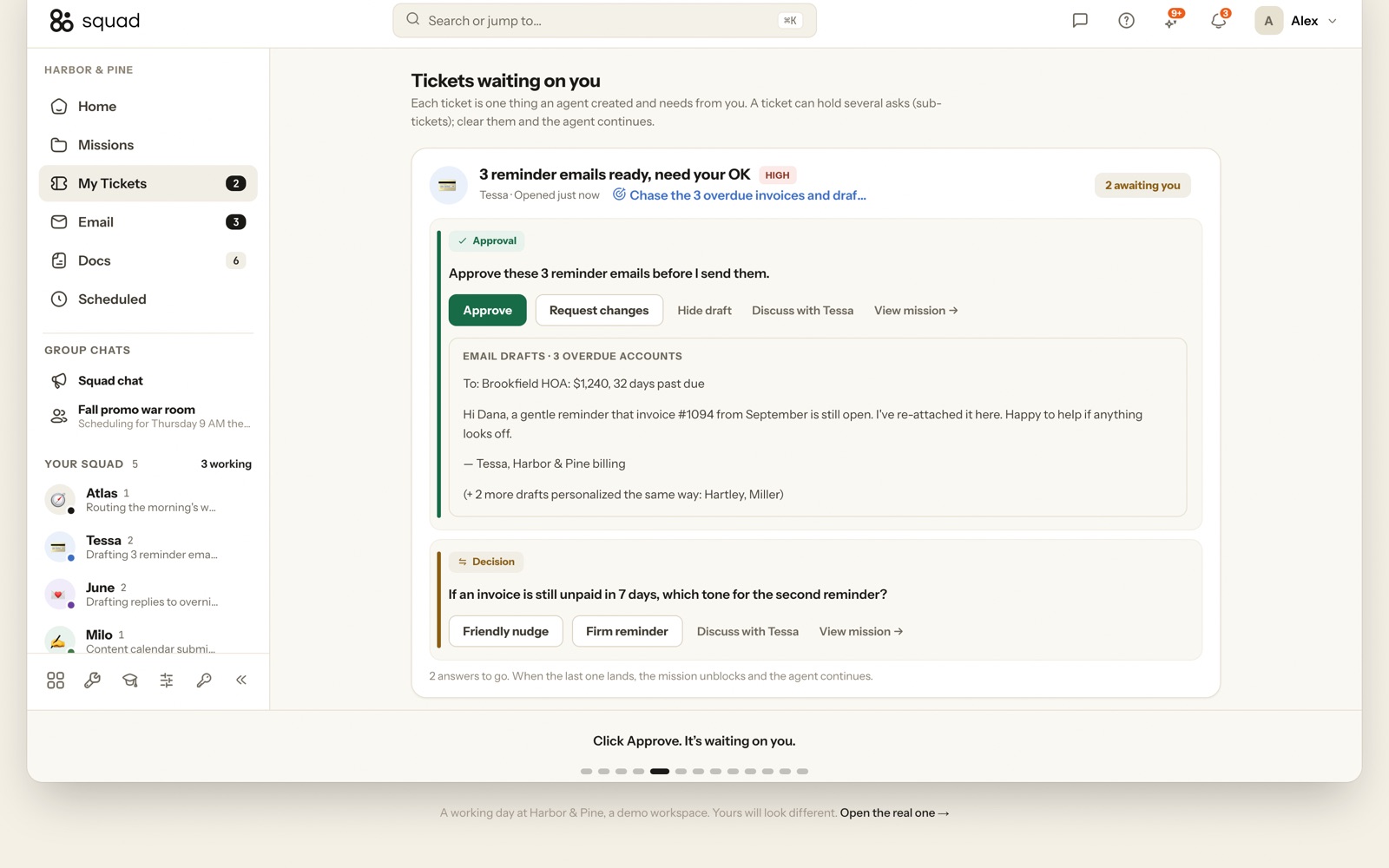
Work surfaces as tickets. A teammate that needs a decision opens one in your queue, and you approve, request changes or pick one of the options it lays out. Your team, and a client through a read-only share link, can see the mission board, threads and full run log.
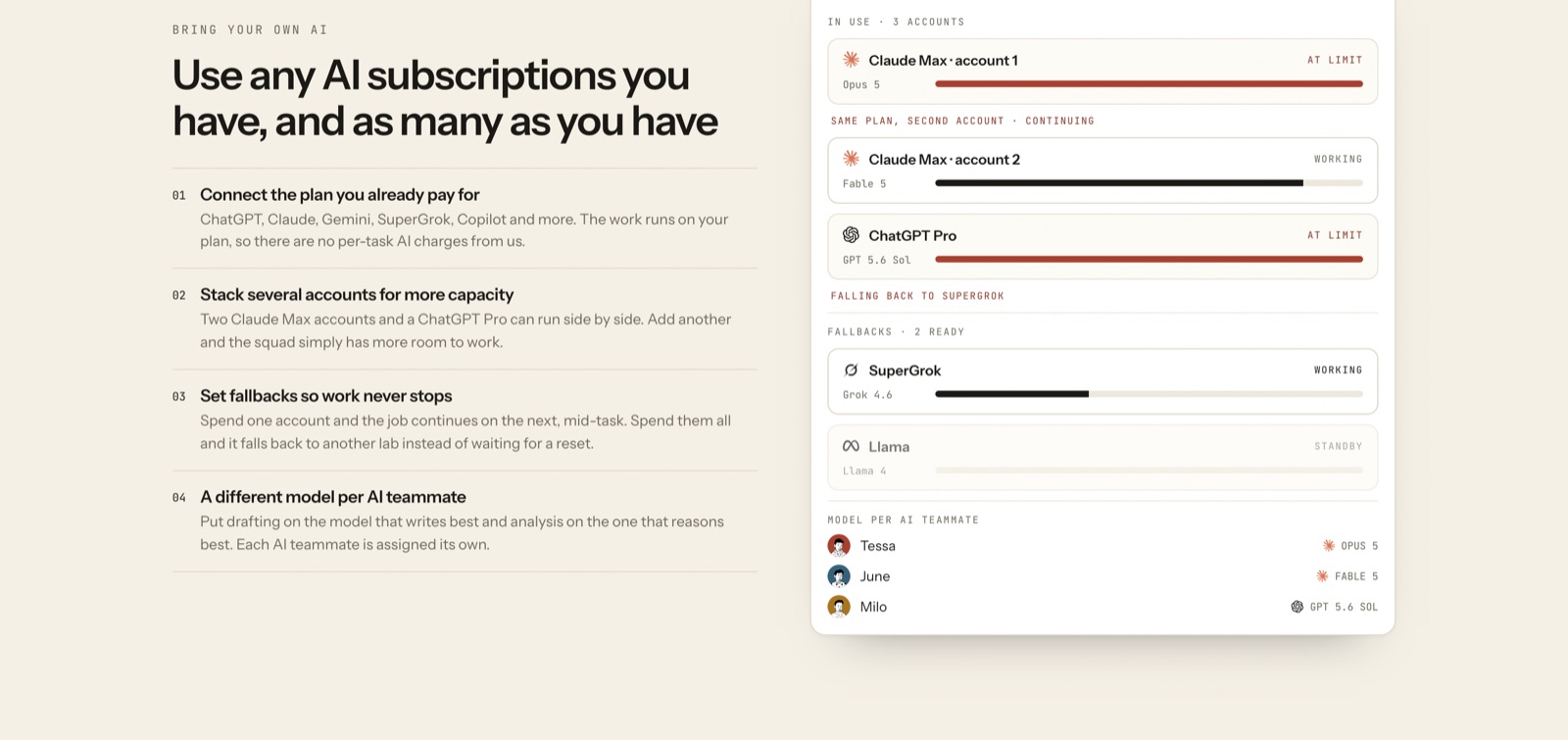
The thinking runs on your AI subscriptions. You assign a model per teammate and stack accounts, so when one plan hits its usage limit mid-task the job continues on the next.
Squad pricing
Squad has no free plan, so budget for it from the start. Here's how the pricing works.
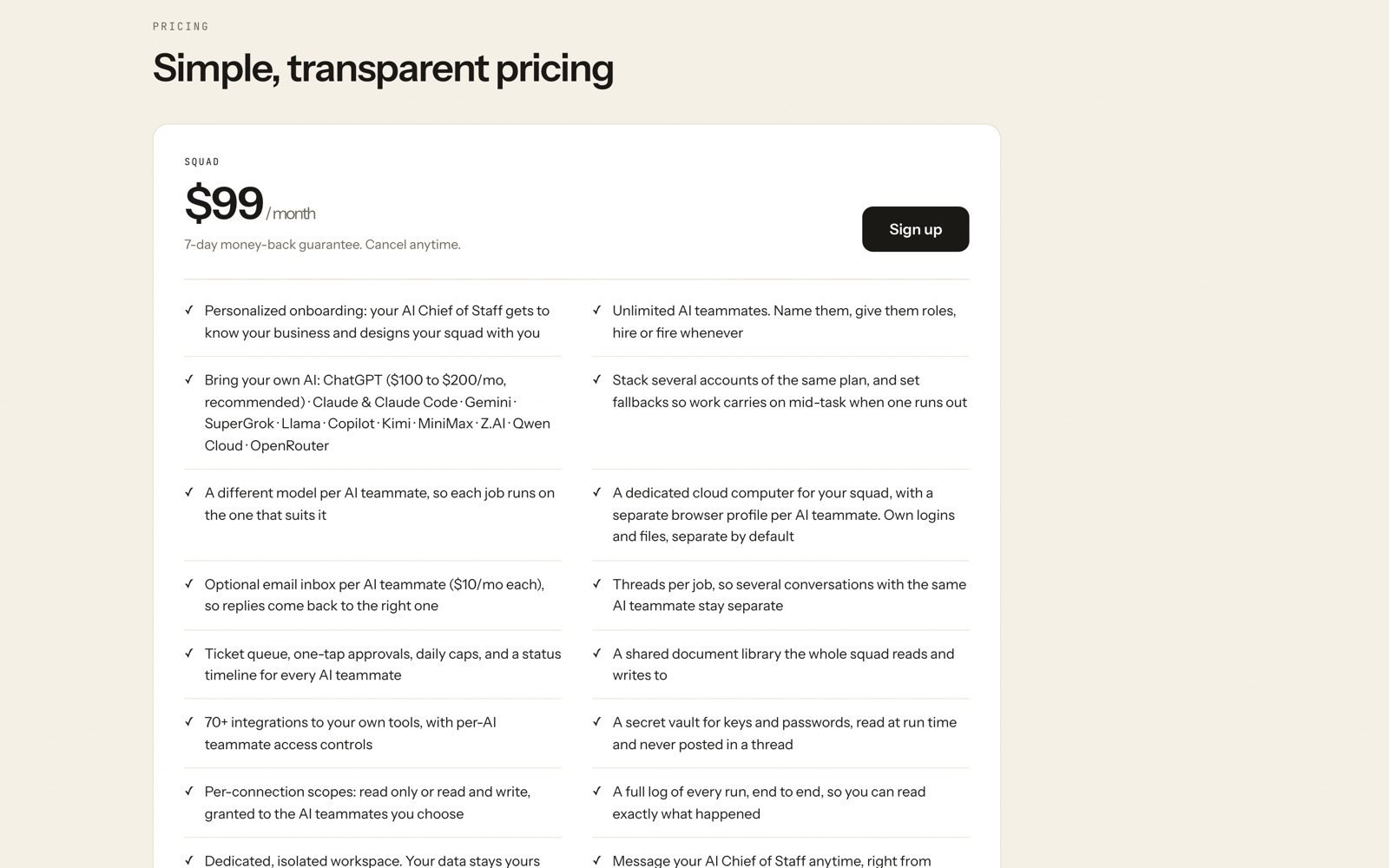
There's a single plan: $99 a month, billed monthly, cancel from the dashboard. It includes unlimited teammates, all 70+ integrations, the cloud computer, approvals, the vault, the document library and the run log. The 7-day money-back guarantee stands in for a free trial; email Squad inside the week for a full refund.
The AI is extra and it's usually the bigger line. Squad recommends a ChatGPT plan at $100 to $200 a month, which puts a typical setup at $199 to $299 all-in, the same range Squad quotes on its own OpenClaw comparison. Heavy use can mean stacking two AI plans, and then the total lands between $300 and $500.
Two metered add-ons: email inboxes for teammates at $10 a month each, and research credits (1,000 a month free, then $5 per 5,000), which Squad says it resells at what the data providers charge it.
Flat pricing favours teams. Five people approving tickets costs the same $99 as one, while Lindy, the closest bundled alternative, charges from $29.99 per user. A solo founder on a tight budget who doesn't already pay for a premium AI plan will usually spend less with Lindy.
Prices change often. Check the current plans on the official site before you pay.
See Squad pricingSquad features
- AI Chief of Staff that proposes teammates and writes each job as an editable doc
- Unlimited teammates, each with one job, one schedule and its own access
- 70+ integrations including Gmail, Slack, HubSpot, Stripe, Notion, Google Sheets, GitHub and Shopify
- Bring your own AI: ChatGPT, Claude, Gemini, SuperGrok, Llama, Copilot, OpenRouter, with fallbacks
- Approval tickets, daily send caps, a secrets vault and a full run log
- Read-only share links so clients can see the work
The product's depth is in control rather than in a feature count. Every teammate gets its own read-only or read-and-write access per connection, logins stay separate by default, outbound actions wait for approval under a daily cap you set, and each run is logged end to end. Around that sit the pieces that make it feel like staff: a Chief of Staff that plans the squad, per-teammate models and schedules, a shared document library, and a shared memory Squad says it builds from every conversation and app you connect.
How to set up Squad
- 1
Start the plan and note the date
Sign up on squad.so and pay the $99. The 7-day money-back guarantee starts now, so write down the refund deadline before you do anything else.
- 2
Connect your AI plan and a fallback
Link the ChatGPT, Claude or Gemini subscription you already use, then a second provider. Without a fallback, the first usage limit you hit looks like the product breaking.
- 3
Brief the Chief of Staff
Tell it about your business and name one job you want gone. Invoice chasing or the Monday report are the safest first picks, because they mostly read from your tools rather than write to them.
- 4
Give the teammate the narrowest access
Connect only the apps the job needs and keep money tools read-only. A reporting teammate never needs write access to Stripe.
- 5
Approve everything for the first few days
Leave every outbound action behind approval, read each draft and correct the teammate in chat. Edit the process doc when the same mistake repeats.
- 6
Loosen rules one job at a time
Once drafts need little editing, raise the send cap or allow auto-send under a threshold, such as invoice reminders under $500. Add a second job only after the first runs cleanly.
What people use Squad for
Chasing overdue invoices
Every weekday at 9:00 AM a teammate reads Stripe for overdue invoices, drafts a reminder per customer and queues them for approval. It follows up on day 3 and day 10, then asks you how to escalate at day 20.
Morning inbox triage
At 7:00 AM a teammate answers routine mail from your docs and past replies, archives noise and flags anything sensitive, with allow lists, block lists and a daily send cap. The brief lands in the dashboard or on Telegram.
The Monday numbers
One page of revenue, refunds and ad spend pulled from Stripe, Google Ads and your store every Monday at 7:00 AM, over read-only connections. It's the lowest-risk first job.
First-line customer support
A teammate answers the repeat questions from your help docs and past tickets all day and hands refunds, bugs and angry customers to a person with the thread and a drafted reply.
Meeting write-ups
In Squad's demo day, a teammate joins a client call, writes it up and files the action items with owners.
Screening job applications
Another demo teammate screens a batch of 34 applications and shortlists four, leaving the interviews to you.
Agency work clients can see
Agencies run client chores through a squad and send a read-only share link, so the client sees the runs and documents without a login to your tools.
Chores in sites without an API
Because each teammate has a browser on its own computer, it can sign in to a supplier portal, fill in a form or download a statement where no integration exists.
Squad vs Zapier
If you're weighing Squad against Zapier, both live in someone else's cloud, so it comes down to price, fit and how much you'd have to move.
| Aspect | Squad | Zapier |
|---|---|---|
| Price to start | $99/month, plus the AI plan it runs on | From $19.99/month |
| Free plan | No | Yes |
| Self-hosting | No | No |
| Your data | In their cloud, exportable | In the vendor's cloud |
Zapier figures are from its pricing page, checked 2026-09-30.
All Zapier alternativesSquad next to similar tools
- Squad vs Lindy
- Lindy is the closest mainstream rival and bundles the AI into credit-metered plans: Plus at $29.99, Pro at $99.99 and Max at $199.99 per user a month. It's cheaper and more predictable for one person; Squad's flat price wins once several people share the work and you already pay for a strong AI plan.
- Squad vs n8n
- n8n is a visual workflow builder you can self-host for free, with AI steps inside the flow. Every step is visible, which makes failures easy to find, but you build it. Squad trades that visibility for plain-English jobs and an approval queue.
- Squad vs Zapier
- Zapier fires a fixed action when a trigger happens. Squad teammates decide steps, draft messages and work in a browser. For a simple trigger-and-action flow, a workflow tool is cheaper and easier to trust.
- Squad vs OpenClaw
- OpenClaw is the open-source, run-it-yourself agent: $5 to $25 a month in server costs by Squad's own figures, with no shared board, approvals or cost tracking unless you build them. Squad calls its own setup "managed rather than owned", which is a fair summary of the trade.
- Squad vs Hermes Agent
- Hermes Agent from Nous Research is the open-source multi-agent queue, MIT licensed and single-host by design, at $5 to $80 a month to run. It suits technical teams; Squad publishes the comparison itself and says so on the page.
Bottom line
Our take on Squad
Squad is worth the money-back week if you run a small business, you already pay for a premium AI plan, and the same back-office chores eat your week. Start with one read-mostly job, set a fallback AI account before anything else, keep approvals on, and judge it on hours saved against the $199 to $299 it really costs. If you'd be buying an AI plan just for Squad, look at Lindy; if the job is a fixed trigger and action, use n8n.

 ChatGPT
 Claude
 Perplexity
 Grok
Grok