

Typefully screenshots
What is Typefully?
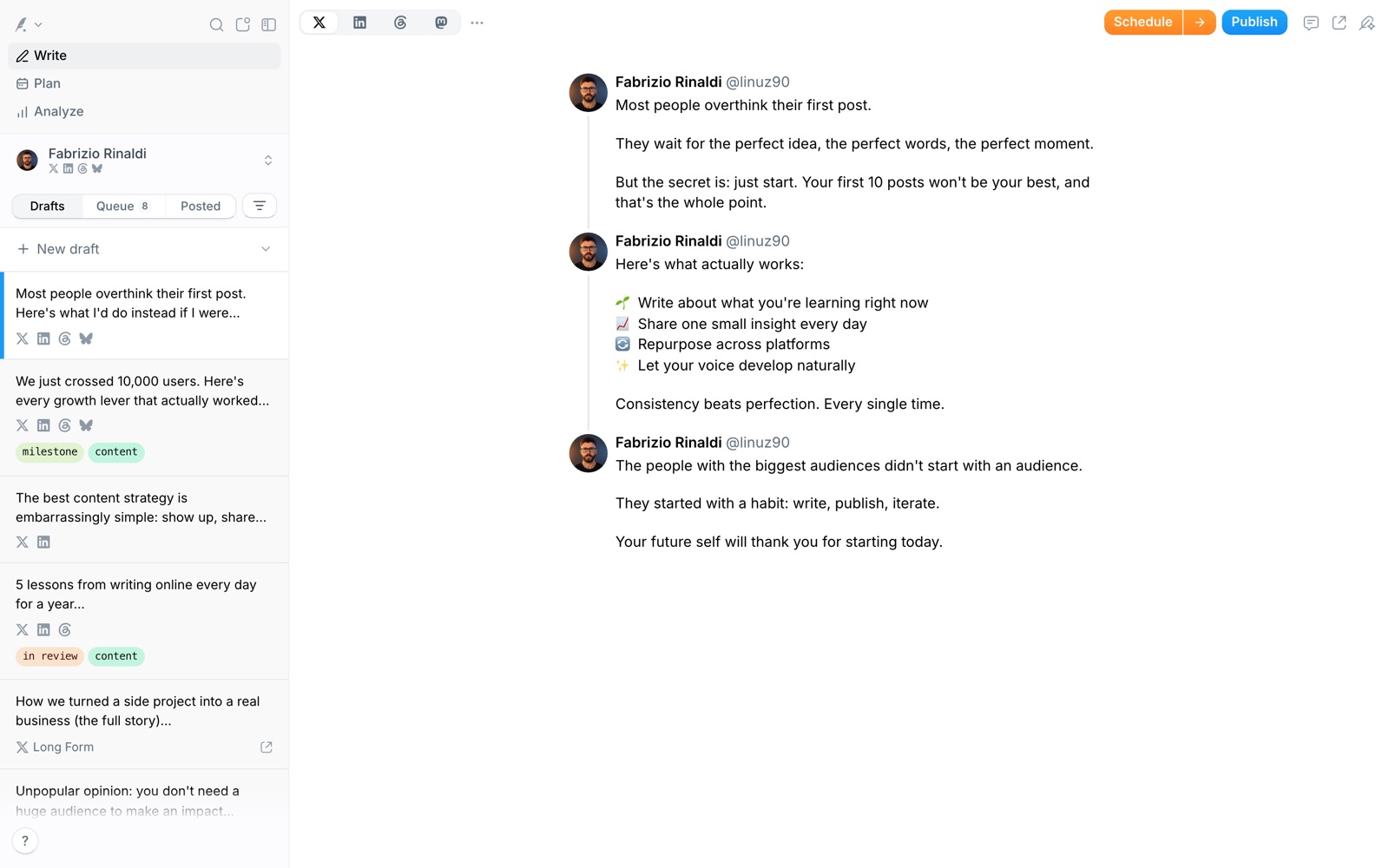
Typefully is a social media writing and publishing tool. You draft posts in a distraction-free editor, schedule them, publish to your networks and watch how they perform. It started as a place to write Twitter threads and now covers X, LinkedIn, Threads, Bluesky, Mastodon and Substack.
It's built for people who treat posting as a habit: founders, creators and small teams who want to write a week of posts in one sitting. The editor, a queue and a calendar do most of the work, and analytics show what landed.
Typefully says more than 10,000 customers use it. That's the vendor's figure. The product it sells is focus: fewer settings than a big social suite, and a writing surface people enjoy.
It doesn't try to be a listening tool or an enterprise approval system. For that you'd look at Hootsuite or Sprout Social. Typefully sits between a notes app and a scheduler.
A note on shelf life: plans and prices have changed, and older blog posts quote figures that no longer match. Confirm on typefully.com/pricing before you buy.
How Typefully works
You connect your accounts, which Typefully groups into social sets, so one draft can go to several networks. Free and Creator include one set; Business lets you manage up to 50.
You write in the editor, split a long idea into a thread, and adapt the version for each network. LinkedIn gets its own tools, such as a first comment and PDF carousels; X gets polls, long-form posts and thread finishers.
You schedule for a specific time, or add posts to a queue that publishes on a recurring pattern. Free allows 10 posts a month, Creator 1,000 and Business 1,500.
Analytics show what performed on X, including profile conversion rate and tweeting streaks. An AI writing assistant can rewrite and improve a draft, and Typefully's API, MCP and agent skills let other tools create drafts for you.
Typefully pricing
Typefully has a free plan you can start on today. Here's where it runs out and what the paid tiers cost.
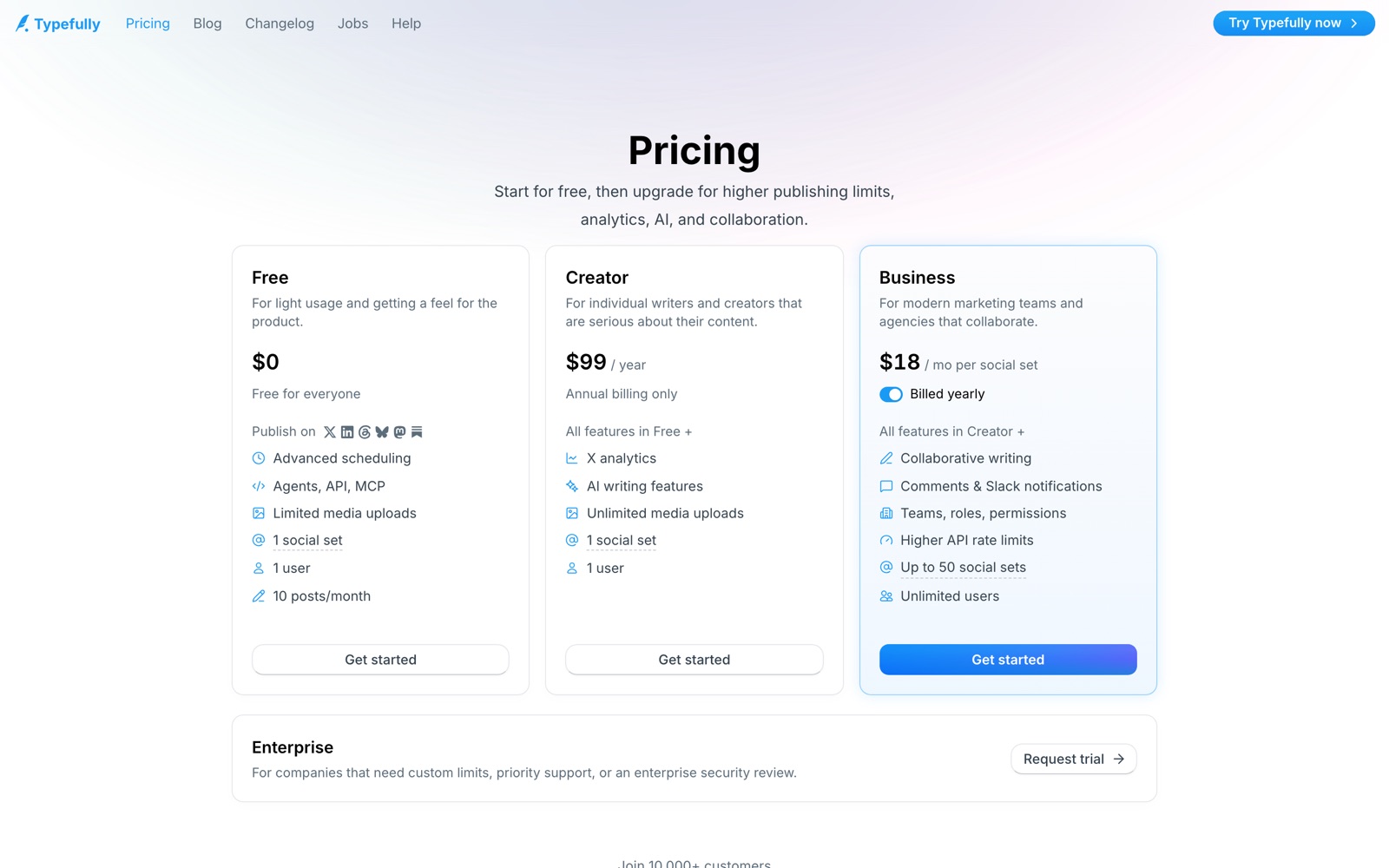
Free is $0. It includes advanced scheduling, API, MCP and agent access, limited media uploads, 1 social set, 1 user and 10 posts a month, with publishing to X, LinkedIn, Threads, Bluesky, Mastodon and Substack. It's enough to test the editor and the queue.
Creator is $99 a year, annual billing only, which works out to about $8.25 a month. It adds X analytics, AI writing features and unlimited media uploads, and raises the limit to 1,000 posts a month, still for 1 social set and 1 user.
Business is $18 a month per social set, billed yearly. It adds collaborative writing, comments and Slack notifications, teams, roles and permissions, higher API rate limits, up to 50 social sets and unlimited users, with 1,500 posts a month. Enterprise is available by request for custom limits and security review.
Price the plan by accounts, not by people. A solo creator needs Free or Creator; an agency with ten client accounts pays for ten social sets on Business. Other websites quote older or different prices, so the pricing page is the one to use.
Prices change often. Check the current plans on the official site before you pay.
See Typefully pricingTypefully features
- Distraction-free editor for posts and threads, with a calendar and queue
- Scheduling and publishing to X, LinkedIn, Threads, Bluesky, Mastodon and Substack
- Social sets: one set groups the accounts you post to together
- X analytics with detailed metrics, profile conversion rate, tweeting streaks and CSV export
- AI writing assistant, rewrite and improve, and AI image descriptions
- LinkedIn extras: first comment and PDF carousels
- Engagement tools: reply to tweets, schedule retweets, automatic plug and auto-DMs
- API, MCP, AI agent skills and integrations with Claude, ChatGPT, Notion, Slack, Raycast and Zapier
The editor is the feature. Threads, auto-numbering, long-form posts, polls and a calendar keep drafting fast, and the queue removes daily decisions. Depth comes from the extras: LinkedIn carousels, X engagement tools such as automatic plug and auto-DMs, and an API with MCP and agent skills for automation.
How to set up Typefully
- 1
Create a free account
Sign up at typefully.com with Google, X, LinkedIn or email, and connect your main account.
- 2
Set up your social set
Group the accounts you post to together. Free and Creator allow one set, so pick the profile that matters most.
- 3
Set your posting queue
Choose your posting days and times so drafts fill slots automatically.
- 4
Batch-write a week
Write five to seven posts in one sitting and drop them in the queue. The free plan's 10 posts a month goes quickly.
- 5
Adapt for each network
Adjust the version for LinkedIn or Threads instead of cross-posting identical text.
- 6
Connect your other tools
Link Slack, Notion, Zapier or Raycast, and try the API, MCP or agent skills if you automate drafting.
- 7
Read the analytics weekly
Note which posts worked, repeat the pattern and decide whether Creator's $99 a year is worth it.
What people use Typefully for
Founder-led social
Write a week of posts in one sitting and let the queue publish them. Keep one or two slots for reacting to news.
Thread writing
Draft long threads with auto-numbering and preview them before publishing. Add a thread finisher to point readers at your product.
Cross-network posting
Publish one idea to X, LinkedIn and Threads, adapted for each. The catch: identical text tends to underperform.
LinkedIn carousels
Publish PDF carousels and add a first comment with the link, which are both listed in the LinkedIn tools.
Agency client accounts
Manage several client social sets in one workspace on Business. Every set is priced separately.
Automation and AI workflows
Use the API, MCP or a Zapier zap to create drafts from a newsletter or a Notion page, then review before publishing.
Content review
Use X analytics to decide which topics deserve a follow-up and which posts to reshare.
Typefully vs Hootsuite
If you're weighing Typefully against Hootsuite, both live in someone else's cloud, so it comes down to price, fit and how much you'd have to move.
| Aspect | Typefully | Hootsuite |
|---|---|---|
| Price to start | Free · Creator $99/year | From $99/user/month |
| Free plan | Yes | No |
| Self-hosting | No | No |
| Your data | In their cloud, exportable | In the vendor's cloud |
Hootsuite figures are from its pricing page, checked 2026-09-30.
All Hootsuite alternativesTypefully next to similar tools
- Typefully vs Buffer
- Buffer covers more networks and suits a marketing calendar across many channels. Typefully focuses on the writing experience and is strongest for X and LinkedIn creators.
- Typefully vs Hypefury
- Hypefury leans into automation and growth features for X. Typefully leans into drafting, and its pricing is easier to read.
- Typefully vs Hootsuite
- Hootsuite is an enterprise suite with listening and approvals. Typefully is lighter and cheaper for individuals and small teams.
- Typefully vs Postiz or self-hosted schedulers
- Open-source schedulers give you control and no per-set pricing if you're happy to host them. Typefully removes the maintenance and adds analytics and an editor.
- Typefully vs scheduling natively on X and LinkedIn
- Each network has a basic scheduler, and it's free. Typefully earns its price when you write for several networks and want a queue and analytics.
Bottom line
Our take on Typefully
If you write on X or LinkedIn regularly, start on Typefully's free plan and build a weekly batching habit. Move to Creator at $99 a year when you want analytics, AI help and more than 10 posts a month, and use Business only if several people or accounts share the work. Skip it if you run ten channels with approval chains.


 ChatGPT
 Claude
 Perplexity
 Grok
Grok