

Crawl4AI screenshots
What is Crawl4AI?
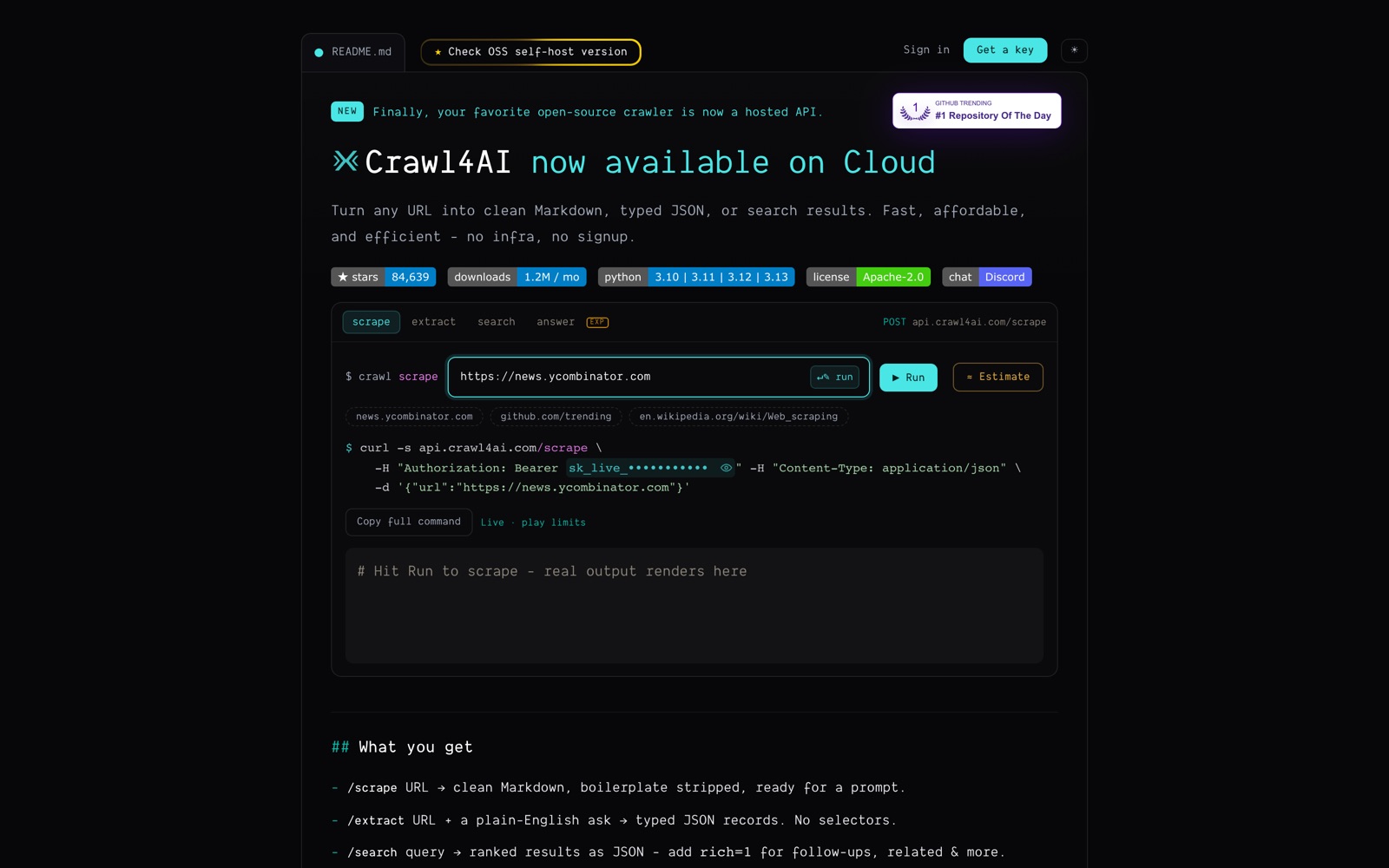
Crawl4AI is an open-source web crawler written in Python that turns websites into clean Markdown and structured data for large language models. You give it a URL and get back Markdown with headings, tables and code intact, menus and footers filtered out, and links turned into a citation list.
It's aimed at developers building RAG pipelines, AI agents and data pipelines who don't want a monthly scraping bill. The library is free under Apache-2.0, and with about 85,000 GitHub stars it's one of the most-starred crawlers on GitHub. On Reddit it's the tool people recommend most when someone complains about paid scrapers' expiring credits.
There are now three ways to run it: as a library inside your Python code, as a Docker server you host, or through Crawl4AI Cloud, a hosted API launched in 2026 that runs the browsers and proxies for you and adds web search.
What it doesn't give you, self-hosted, is anything managed. Proxies, CAPTCHA handling, retries, scaling and uptime are your job. The cloud covers those, but it's new and its prices are labelled launch pricing.
A note on shelf life: Crawl4AI releases often (v0.9.4 landed on September 23, 2026), and the cloud's pricing is discounted for its first year. Check the README and the pricing page before you plan around either.
How Crawl4AI works
In the library, you open an AsyncWebCrawler and call arun with a URL. It drives a real browser (Chromium, Firefox or WebKit), runs JavaScript, waits for content and returns the page as Markdown, HTML, links, media and metadata. arun_many crawls many URLs with a memory-aware dispatcher.
Content filters decide what stays: pruning removes boilerplate, BM25 keeps passages that match a query, and an LLM filter can do it with a model. For structured data you define a CSS or XPath schema, or hand a schema to any LLM provider for typed JSON.
For whole sites, deep crawl strategies (breadth-first, depth-first, best-first) follow links with crash recovery, and the adaptive crawler stops once it has gathered enough to answer your query. URL seeding from sitemaps and Common Crawl finds pages before crawling.
The Docker server wraps the same engine in a REST API, MCP endpoint and dashboard, secured with your own token. Crawl4AI Cloud runs it for you behind one key: the engine is chosen per domain (cache, plain HTTP or browser), and each call returns its cost in credits in a response header.
Crawl4AI pricing
You can run Crawl4AI yourself for free under its Apache-2.0 license, so the real cost is the server and the hours someone spends keeping it updated.
The open-source library and Docker server are free forever under Apache-2.0. Your costs are servers, proxies if you need them, and LLM tokens if you use LLM extraction.
Crawl4AI Cloud is pay as you go in credits worth $0.001 each. A scrape is 0.2 credits at the light level; the effort multiplier is ×0.5 for pages already in Crawl4AI's archive, ×1 for light and standard fetches and ×10 when a real browser renders the page. A search is 0.5 credits, an answer 1 credit, extraction 0.2 credits plus tokens (2.5 credits in and 15 out per 5,000 tokens), and bulk jobs 0.2 credits per URL. Checked October 3, 2026.
New accounts get 10,000 credits ($10) once at signup until December 31, 2026, then $5 to start, and a 7-day pass of 20 credits exists for quick tests. Top-up packs are $10 for 10,000 credits, $25 for 27,500 and $100 for 125,000. Bought and signup credit never expire, and a paid top-up raises limits to 10 concurrent requests and 120 a minute.
In practice a light page costs about $0.0002 and a browser-rendered page about $0.002. Crawl4AI marks this as discounted launch pricing for the first year that may change, though credit you already hold keeps its value. If your volume is steady and you have someone to run servers, self-hosting is the cheapest option of all.
Prices change often. Check the current plans on the official site before you pay.
See Crawl4AI pricingCrawl4AI features
- Async Python crawler with Chromium, Firefox and WebKit
- Markdown generation with pruning, BM25 and LLM content filters
- Structured extraction with CSS, XPath, regex or any LLM into a JSON schema
- Deep crawl (BFS, DFS, best-first) with crash recovery and adaptive crawling
- Sessions, persistent browser profiles, proxies, stealth mode and hooks
- Docker server with REST endpoints, MCP and a monitoring dashboard
- Crawl4AI Cloud: scrape, search, answer, extract, batch and bulk jobs behind one API key
The depth is in crawl control: sessions with saved logins, hooks at every step, adaptive crawling that stops when it has enough, and Markdown filters you can tune per query. Most paid APIs hide these behind defaults. The trade is that you configure more, and on your own servers you also own the anti-bot fight.
How to set up Crawl4AI
- 1
Install the library
Install from PyPI and run the setup command once to download the browser.
pip install -U crawl4ai crawl4ai-setup - 2
Crawl your first page
Open an AsyncWebCrawler and print the Markdown for one URL to check the output quality on a site you care about.
import asyncio from crawl4ai import AsyncWebCrawler async def main(): async with AsyncWebCrawler() as crawler: result = await crawler.arun(url="https://news.ycombinator.com") print(result.markdown) asyncio.run(main()) - 3
Tune the Markdown
Add a pruning or BM25 content filter so only the main content reaches your model, and compare token counts before and after.
- 4
Run it as a server
Use the Docker image to get a REST API, an MCP endpoint and a dashboard, protected by your own API token, so other services and agents can call it.
- 5
Add proxies for hard sites
Configure proxy rotation and stealth mode for sites that block automation. Expect to pay a proxy provider for this when self-hosting.
- 6
Or use the cloud instead
Verify your email for a key and $10 of credit, then call api.crawl4ai.com/scrape. Use the estimate endpoint to see a call's credit range before running it at scale.
What people use Crawl4AI for
RAG over documentation
Deep-crawl a docs site, keep the fit Markdown and load it into a vector store. Use caching so re-crawls skip unchanged pages.
Self-hosted scraping for n8n
Run the Docker server and call it from n8n's HTTP Request node, as Reddit users do to avoid monthly credit plans. You still need proxies for protected sites.
Research agents
Give an agent the MCP endpoint so it can fetch and read pages. The adaptive crawler helps it stop once it has enough to answer.
Structured product data
Write a CSS schema once for a product page layout and extract thousands of pages with no LLM cost. Layout changes break schemas, so monitor failures.
Bursty or one-off crawls
Use the cloud's non-expiring credits for jobs that come in spikes. A browser-rendered page costs ten times a light fetch, so estimate first.
Crawling behind a login
Use a persistent browser profile with your saved session to crawl pages you have access to. Respect the site's terms; logged-in scraping carries more legal risk.
Training or evaluation datasets
Seed URLs from sitemaps or Common Crawl and crawl at scale on your own hardware. Check licensing of the content you collect before using it for training.
Crawl4AI vs Firecrawl
Most people weighing Crawl4AI are really asking whether to keep paying for Firecrawl. You trade convenience for control: run it yourself and the data is yours, or pay someone else to run it for you.
| Aspect | Crawl4AI | Firecrawl |
|---|---|---|
| Price to start | Free (open source) · Cloud pay as you go | From $19/month |
| Free plan | Yes | Yes |
| Self-hosting | Yes | No |
| Your data | On your own servers if you self-host | In the vendor's cloud |
Firecrawl figures are from its pricing page, checked 2026-10-02.
All Firecrawl alternativesCrawl4AI next to similar tools
- Crawl4AI vs Firecrawl
- Firecrawl is a managed API from $19 a month for 5,000 credits that expire monthly, with search, interaction and a keyless MCP. Crawl4AI is free to self-host, and its cloud credits never expire. Firecrawl is less setup; Crawl4AI is more control and cheaper for bursty work.
- Crawl4AI vs Apify
- Apify's store has ready-made scrapers for specific sites, from $19 a month plus compute units. Crawl4AI is a general crawler you configure yourself. Use Apify when a maintained Actor exists; use Crawl4AI for general pages into an LLM.
- Crawl4AI vs Scrapy
- Scrapy is the long-standing Python crawling framework, fast for static HTML but without built-in browser rendering or LLM-ready Markdown. Crawl4AI is built for JavaScript sites and AI output.
- Crawl4AI vs Playwright alone
- Playwright gives you the browser and nothing else. Crawl4AI adds Markdown generation, content filtering, extraction strategies and crawl orchestration on top.
Bottom line
Our take on Crawl4AI
If you write Python and want web pages as Markdown for an LLM, install Crawl4AI and try it on your target sites today; it costs nothing. Move to the Docker server when other services need it, and try the cloud's free $10 if you'd rather not run browsers and proxies. Skip it if you want a fully managed API with search and support from day one; Firecrawl is the closer fit.



 ChatGPT
 Claude
 Perplexity
 Grok
Grok