

Firecrawl screenshots
What is Firecrawl?
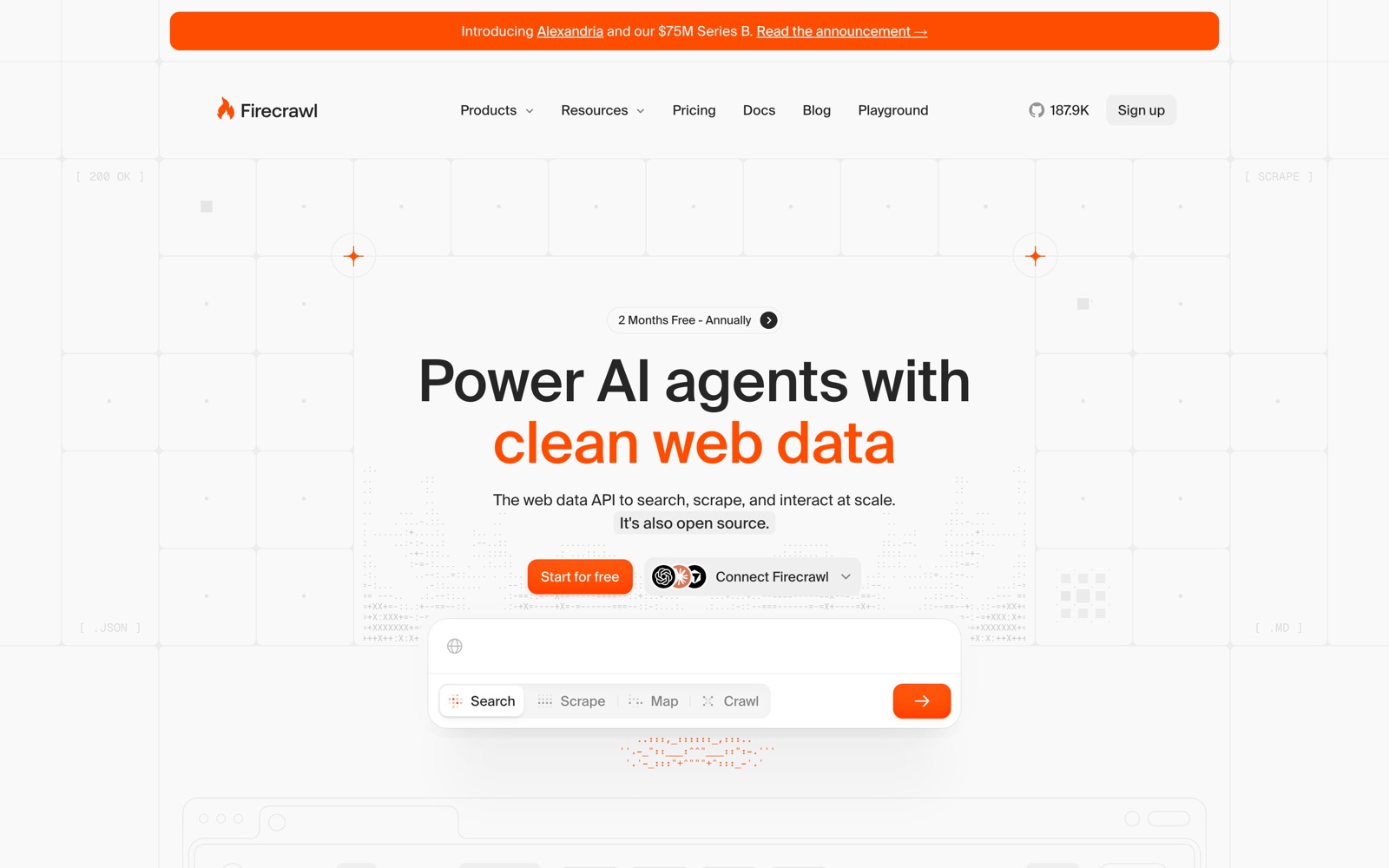
Firecrawl is an API that fetches web pages and hands them back in a form a language model can use. You send a URL, or a search query, and get clean Markdown, HTML, structured JSON or a screenshot, with navigation, footers and ads removed. It also crawls whole sites, lists their URLs and can click through pages that need interaction.
It's built for developers wiring the live web into AI products: retrieval pipelines, research agents, chat assistants that cite current pages, lead enrichment and onboarding forms that pre-fill from a company's site. The homepage says more than 150,000 companies use it, which is Firecrawl's own figure.
It sits beside, or replaces, a home-made stack of Playwright or Puppeteer, rotating proxies and an HTML-to-Markdown step. Compared with Apify it's one general API rather than a store of site-specific scrapers. The core is open source under AGPL-3.0, and the GitHub repository had about 188,000 stars when checked.
It doesn't decide what to do with the data. There's no spreadsheet view or no-code scraper builder for business users, and the newer Agent endpoint is still in preview with dynamic pricing. Whether scraping a given site is allowed is your call; Firecrawl now also sells licensed access to some content through a program it calls Alexandria.
A note on shelf life: the pricing table says it took effect September 4, 2026, and Firecrawl ships new endpoints often (Interact and Monitor are recent). Older blog posts quote different plans and credit costs, so read the pricing page before you budget.
How Firecrawl works
You call an endpoint with an API key, or without one at lower limits. Scrape takes one URL, Crawl follows a site's links, Map returns every URL it finds, and Search runs a web query and scrapes the results. Each request is billed in credits from a single monthly balance.
Firecrawl loads the page in a browser, renders JavaScript and waits for content to appear, then strips the boilerplate and converts what's left to Markdown. PDFs and DOCX files are parsed the same way. It can also pull from its own web index when speed matters more than freshness.
For structured output you pass a schema or a prompt and get JSON back, which costs 4 extra credits per page because an LLM does the extraction. Interact keeps a browser session open so you, or an AI prompt, can click, type and scroll before scraping; it's billed per browser minute.
Results come back in the response, or through signed webhooks for long crawls. Agents connect through the MCP server or the CLI, which installs skills into coding agents. If you self-host, the same core APIs run on your own Docker stack and LLM extraction goes to a provider you configure.
Firecrawl pricing
You can run Firecrawl yourself for free under its AGPL-3.0 license, so the real cost is the server and the hours someone spends keeping it updated.
Free is $0 with no card: 1,000 credits a month (about 1,000 basic pages or 500 searches), 2 concurrent browsers and low rate limits, 10 scrape requests and 2 crawl requests a minute. Prices below are Firecrawl's USD list prices, checked October 2, 2026.
Hobby is $19/month, or $16/month billed yearly ($190 a year), for 5,000 credits and 5 concurrent browsers. Standard is $99/month, or $83/month yearly, for 100,000 credits, 25 concurrent browsers and a standard DPA. Growth is $399/month, or $333/month yearly, for 500,000 credits, 50 browsers and a shared Slack channel. Scale is $749/month, or $599/month yearly, for 1,000,000 credits, 100 browsers, invoiced billing and one month of credit rollover. Enterprise is custom, with SSO, zero data retention and an SLA.
Credits are where the real cost hides. A basic scrape, crawl or map is 1 credit a page, search is 2 credits per 10 results, Interact is 2 credits per browser minute, and JSON, Question or Highlight output adds 4 credits a page. When a paid plan runs dry, pay-as-you-go adds credits in $5 blocks: 1,000 credits on Hobby, 2,000 on Standard, 2,500 on Growth, 5,000 on Scale, up to a monthly cap you set.
Do the maths per page. Hobby works out to about $0.0038 a page at full use, Standard about $0.001, and Hobby plus $5 pay-as-you-go blocks costs more than Standard's $99 once you pass about 21,000 pages a month. If you need JSON on every page, divide each plan's pages by five. Light, occasional users should stay on Free; teams with steady volume and the ops skills to run Docker can self-host the core and pay only for servers and LLM calls.
Prices change often. Check the current plans on the official site before you pay.
See Firecrawl pricingFirecrawl features
- Scrape: one URL to Markdown, HTML, structured JSON or a screenshot
- Crawl: follow a site's links and return every page
- Map: list every URL on a site
- Search: web search that returns the full content of each result
- Interact: click, type, scroll and wait on a page through browser actions or AI prompts
- Monitor: re-check pages and track changes between scrapes
- Document parsing for PDFs and DOCX files
- MCP server (keyless or with an API key), a CLI and agent skills
- Webhooks with signed payloads, batch scrape and PII redaction
The depth is in the output, not the endpoint list. Markdown that drops navigation and ads means fewer tokens per page (Firecrawl claims 93% fewer), and JSON mode turns a page into fields you define. The agent tooling is unusually complete: a keyless MCP server, a CLI that installs skills into coding agents, and an onboarding file written for agents to read. Monitor and Interact are newer and priced differently from scraping, so check their credit rates before building on them.
How to set up Firecrawl
- 1
Try it without an account
The docs show a scrape request that works with no API key, at low rate limits. It's a quick way to check how a site you care about comes back.
curl -s -X POST "https://api.firecrawl.dev/v2/scrape" \ -H "Content-Type: application/json" \ -d '{"url": "https://firecrawl.dev", "formats": ["markdown"]}' - 2
Create a free account and an API key
Sign up at firecrawl.dev for 1,000 free credits a month, no card needed, and create a key on the API keys page. Keep it in an environment variable, not in code.
- 3
Install an SDK
Pick the Python or Node SDK (Go, Java, Ruby, Rust, .NET, PHP and Elixir also exist) and run a search or scrape.
pip install firecrawl-py from firecrawl import Firecrawl app = Firecrawl(api_key="fc-YOUR_API_KEY") result = app.search("firecrawl", limit=5) - 4
Connect your AI agent
Add the MCP server to Claude Code, Codex or Cursor, or run the CLI's init command to install Firecrawl skills into every coding agent it finds.
claude mcp add --transport http firecrawl https://mcp.firecrawl.dev/v2/mcp - 5
Price your real workload
Run a sample of your target pages and read the credits used in the dashboard. Count JSON extraction at 5 credits a page and searches at 2 credits per 10 results before choosing a plan.
- 6
Set a pay-as-you-go limit
On a paid plan, set the monthly pay-as-you-go cap in billing settings, or 0 to switch it off, so a runaway crawl can't keep buying credits.
- 7
Self-host if you need control
Clone the repository at a pinned release and start it with Docker Compose. The docs' quickstart turns authentication off, so add auth, TLS and storage before exposing it.
What people use Firecrawl for
RAG over a documentation site
Crawl the docs, store the Markdown in a vector database and answer questions from it. Re-crawls cost credits each time, so use Map to find changed pages first.
Web research agents
Give an agent Search, which returns full page content instead of snippets, so it can read sources and cite them. At 2 credits per 10 results, a busy agent burns through Hobby quickly.
Coding agents that read the web
Add the MCP server to Claude Code or Cursor so the agent can pull current library docs while it works. The keyless server is enough to try it; heavier use needs a key.
Lead enrichment
Scrape a company's site and extract fields such as industry, product and pricing model as JSON. Each JSON page costs 5 credits, so filter the list before you run it.
Pre-filling onboarding
When a user enters their website at sign-up, scrape it and pre-fill their profile or a first draft of content. Keep a fallback for sites that block scrapers or answer with errors.
Price and change monitoring
Use Monitor to re-check competitor or supplier pages and flag what changed. Its deterministic extraction is billed at a flat 7 credits per page per check, so schedule checks with care.
Turning PDFs and DOCX files into text
Point Firecrawl at document URLs to get Markdown for summarising or indexing. Scanned PDFs and complex tables are worth spot-checking before you trust the output.
Firecrawl vs Apify
Most people weighing Firecrawl are really asking whether to keep paying for Apify. You trade convenience for control: run it yourself and the data is yours, or pay someone else to run it for you.
| Aspect | Firecrawl | Apify |
|---|---|---|
| Price to start | Free · paid from $19/month | From $19/month |
| Free plan | Yes | Yes |
| Self-hosting | Yes | No |
| Your data | On your own servers if you self-host | In the vendor's cloud |
Apify figures are from its pricing page, checked 2026-10-02.
All Apify alternativesFirecrawl next to similar tools
- Firecrawl vs Apify
- Apify sells a store of ready-made scrapers for specific sites, starting at $19/month of prepaid usage plus $0.20 per compute unit. Firecrawl is one API for any page, priced per page. Apify wins when a maintained scraper exists for the site; Firecrawl wins for general pages into an LLM.
- Firecrawl vs Crawl4AI
- Crawl4AI is a free, open-source Python crawler that also outputs LLM-ready Markdown, with no credits. You run the browsers, proxies and scaling yourself. Firecrawl charges for doing that work and adds search, MCP and managed anti-bot handling.
- Firecrawl vs Bright Data
- Bright Data is a proxy and web-data company with large residential proxy networks and unblocking tools for heavily protected sites. It's aimed at high-volume scraping teams. Firecrawl is simpler to start with and built around AI output formats.
- Firecrawl vs Playwright or Puppeteer
- Running your own headless browser costs nothing in licences and gives full control. You also own proxies, retries, HTML cleanup and scaling. Firecrawl's own benchmark puts its page coverage at 96% against Puppeteer's 79%, a vendor figure worth testing on your sites.
- Firecrawl vs self-hosted Firecrawl
- The AGPL core runs on your servers with no credits, but leaves out Agent, Browser, Interact and the managed anti-bot paths, and LLM extraction needs your own provider. Cloud is the faster start; self-hosting suits steady volume and a team that runs infrastructure.
Bottom line
Our take on Firecrawl
If you're building an AI feature that needs live web pages, start on Firecrawl's free 1,000 credits or the keyless MCP server and run your own target sites through it. Move to Hobby or Standard once you know your monthly page count, and budget JSON extraction at five times a basic scrape. Skip it if a ready-made Apify scraper already covers your one site, or if your team would rather run Crawl4AI or the self-hosted core for free.



 ChatGPT
 Claude
 Perplexity
 Grok
Grok